
Current Page

Crafting bradesco_next unified credit and debit card experience

Crafting bradesco_next unified credit and debit card experience

An end-to-end redesign of bradesco_next’s cards experience, consolidating credit and debit journeys into a single, intuitive flow and validating key design decisions with real users.

The solution reached its final form after multiple research, testing, and refinement cycles, meeting all predefined success criteria before moving forward.

A new interaction model simplified how users browse and switch between cards.

The redesigned card sub-home proved intuitive, even for first-time users.

Key card actions became easier to discover, reducing navigation friction.

Visual hierarchy, copy, and interactions improved clarity and confidence.

The solution reached validation without critical usability issues.

0%

0%

Usability score achieved

Measured during usability testing with onboarding support.

0%

0%

Ease of use rating

Average score reported by users in the final prototype.

0m +

0m +

Users impacted

Projected reach across Bradesco_next’s card ecosystem.

0%

0%

Usability score achieved

Measured during usability testing with onboarding support.

0%

0%

Ease of use rating

Average score reported by users in the final prototype.

0m +

0m +

Users impacted

Projected reach across Bradesco_next’s card ecosystem.

Year

2025

Project

bradesco_next

Category

UX/UI

Project duration

6-8 months

0 — OVERVIEW

Context and Challenge

Bradesco was preparing to merge three different apps — Bradesco App, Bradesco Cards, and the digital bank Next — into a single, unified ecosystem called Bradesco_next. For the first time ever, millions of users would manage multiple debit and credit cards from different origins inside a single, cohesive experience.

0 — OVERVIEW

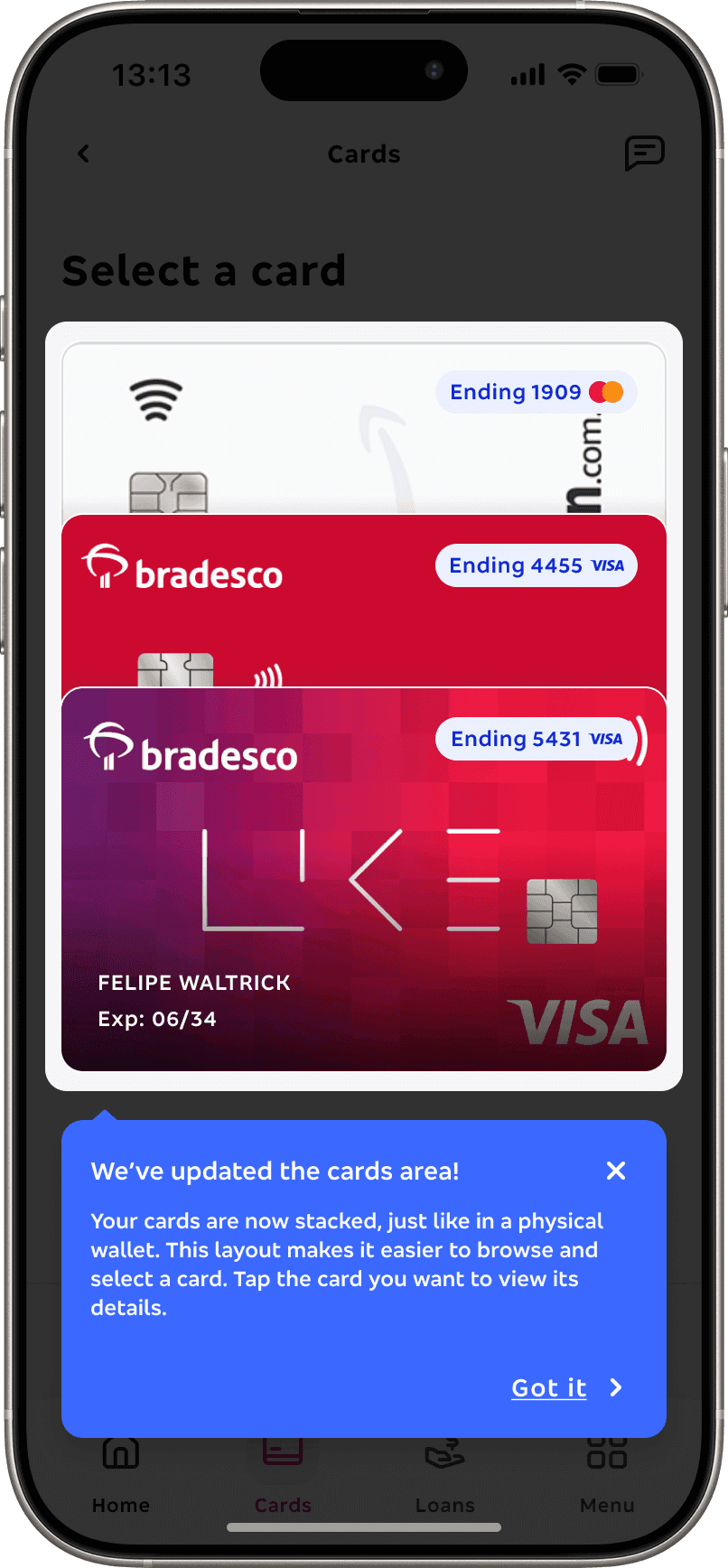
Context and Challenge

Bradesco was preparing to merge three different apps — Bradesco App, Bradesco Cards, and the digital bank Next — into a single, unified ecosystem called Bradesco_next. For the first time ever, millions of users would manage multiple debit and credit cards from different origins inside a single, cohesive experience.

One UX for multiple audiences

Our main focus was to ensure the new app works for vastly different users — across ages, incomes, and devices — without losing clarity or performance.

One UX for multiple audiences

Our main focus was to ensure the new app works for vastly different users — across ages, incomes, and devices — without losing clarity or performance.

A project with real business impact

The new experience affects 20+ million customers and drives key business metrics — from engagement and satisfaction to churn and conversion.

A project with real business impact

The new experience affects 20+ million customers and drives key business metrics — from engagement and satisfaction to churn and conversion.

From three apps and fragmented card patterns to a single, unified, multi-card experience - designed for scale and accessibility

Bradesco App

Bradesco Cards

Next Banking
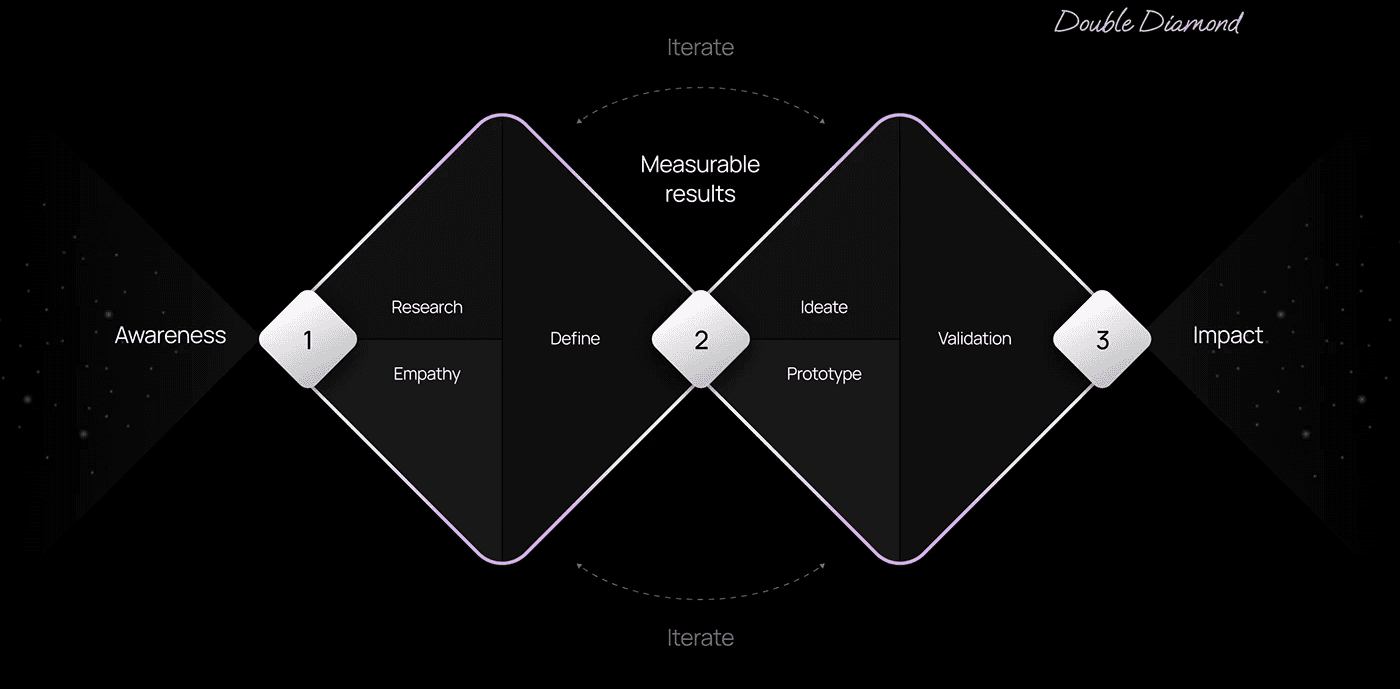
Designing a complex multi-card experience required a clear UX process — grounded in research, iteration, and validation — especially since this wasn’t a linear journey. That’s why we used the Double Diamond as a guiding framework.

Designing a complex multi-card experience required a clear UX process — grounded in research, iteration, and validation — especially since this wasn’t a linear journey. That’s why we used the Double Diamond as a guiding framework.

01 — DISCOVER

To build a unified card experience, I first had to uncover which cards and functionalities would migrate to Bradesco_Next.

Through this study, I discovered that Bradesco operates across four main card categories — B2K, P2, Multiple, and Debit — each with its own variations, behaviors, and features tailored to different audiences.

01 — DISCOVER

To build a unified card experience, I first had to uncover which cards and functionalities would migrate to Bradesco_Next.

Through this study, I discovered that Bradesco operates across four main card categories — B2K, P2, Multiple, and Debit — each with its own variations, behaviors, and features tailored to different audiences.

B2K

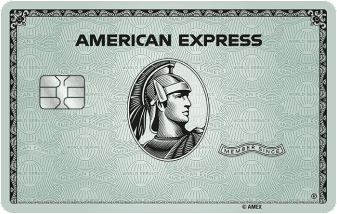
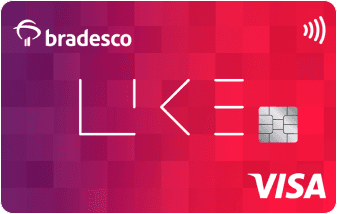
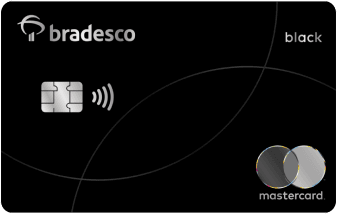
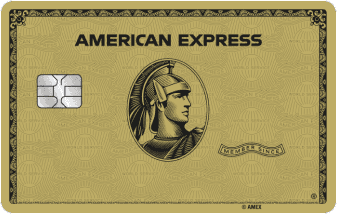
Bradesco’s traditional credit cards, available as Visa, Mastercard, Elo, or American Express.

Icon

Offers a full range from entry-level to premium tiers like Gold, Platinum, and Black.

Icon

Available on: Bradesco PF & Bradesco Cartões

B2K

Bradesco’s traditional credit cards, available as Visa, Mastercard, Elo, or American Express.

Icon

Offers a full range from entry-level to premium tiers like Gold, Platinum, and Black.

Icon

Available on: Bradesco PF & Bradesco Cartões

Bradesco_Next — Multi / Debit

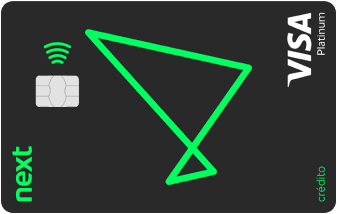
The new Bradesco_Next Visa Platinum replaces the old Next green card and can be configured as debit-only or multi.

Icon

Combines debit and credit in a single product, designed as the ecosystem’s flagship card.

Icon

Available on: Bradesco_Next

Bradesco_Next — Multi / Debit

The new Bradesco_Next Visa Platinum replaces the old Next green card and can be configured as debit-only or multi.

Icon

Combines debit and credit in a single product, designed as the ecosystem’s flagship card.

Icon

Available on: Bradesco_Next

P2 Partner Credit Cards

Co-branded credit cards created in partnership with major brands such as Amazon, C&A, and Gol Smiles.

Icon

Always credit-only products, focused on loyalty and partners exclusive benefits.

Icon

Available on: Bradesco Cartões

P2 Partner Credit Cards

Co-branded credit cards created in partnership with major brands such as Amazon, C&A, and Gol Smiles.

Icon

Always credit-only products, focused on loyalty and partners exclusive benefits.

Icon

Available on: Bradesco Cartões

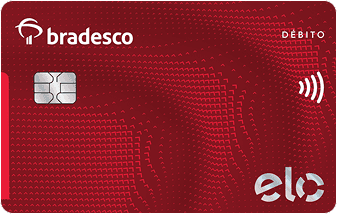
Pure Debit — Debit Card

A debit-only card (Elo Internacional) directly linked to checking accounts.

Icon

Provides essential payment features with direct access to your bank account.

Icon

Available on: Bradesco PF

Pure Debit — Debit Card

A debit-only card (Elo Internacional) directly linked to checking accounts.

Icon

Provides essential payment features with direct access to your bank account.

Icon

Available on: Bradesco PF

B2K mapped features included

Apple Pay

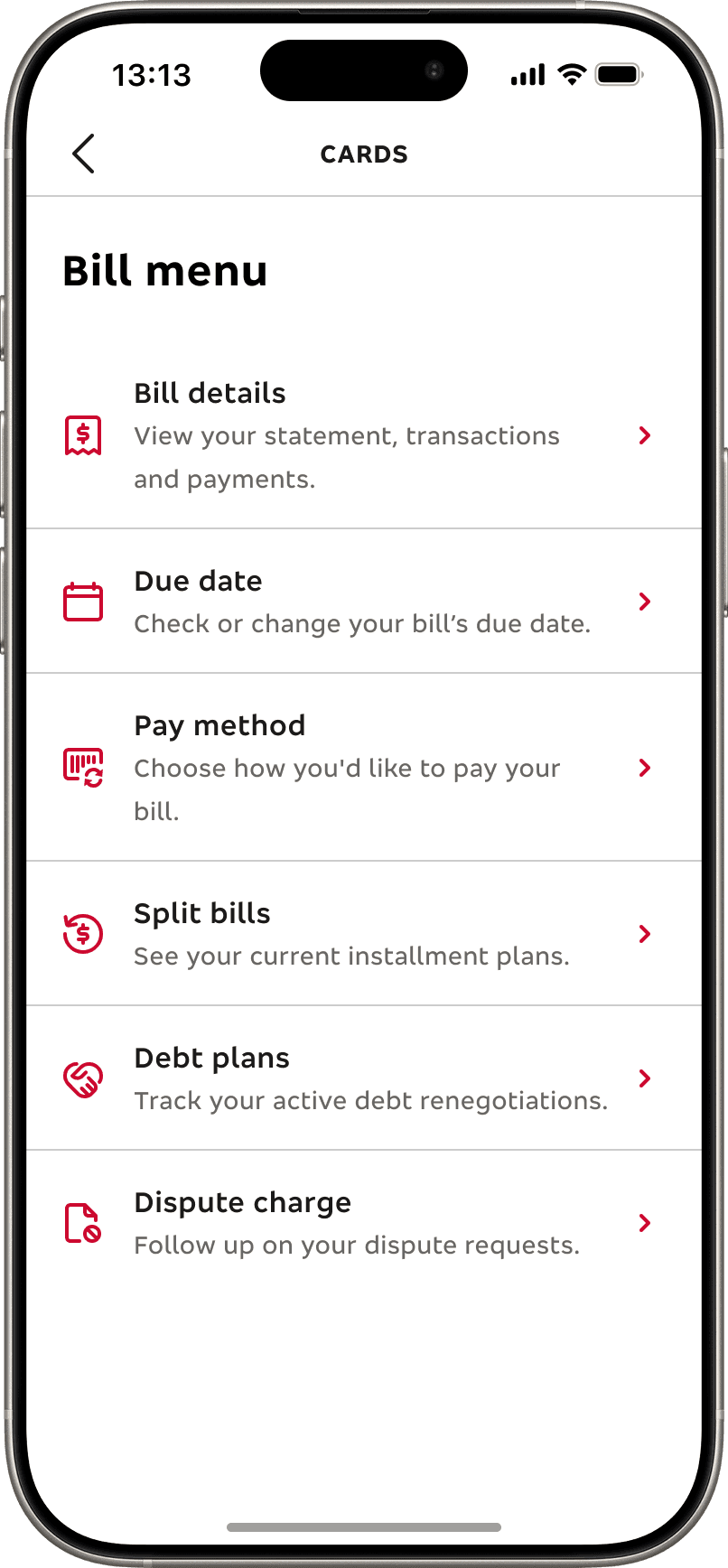
Bill details

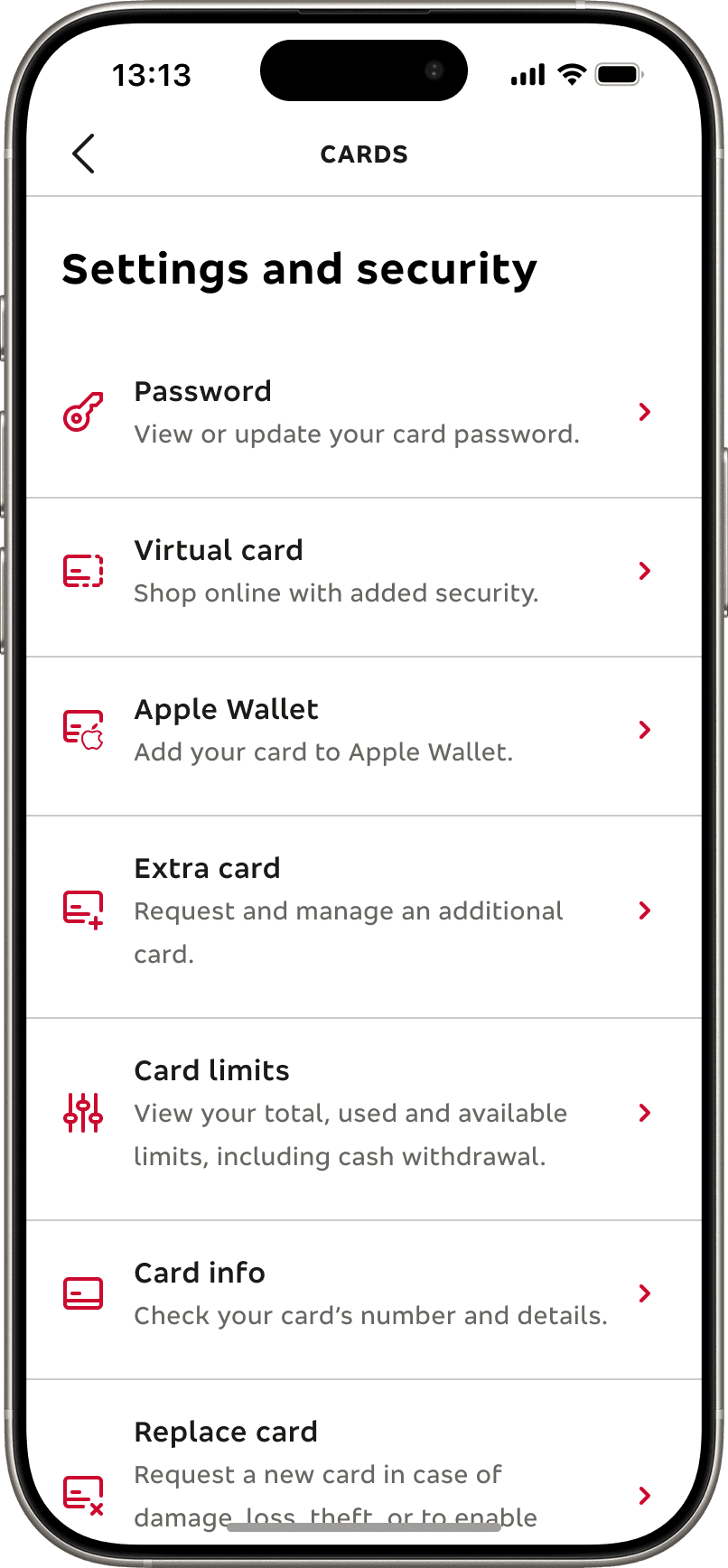
Card info

Card limits

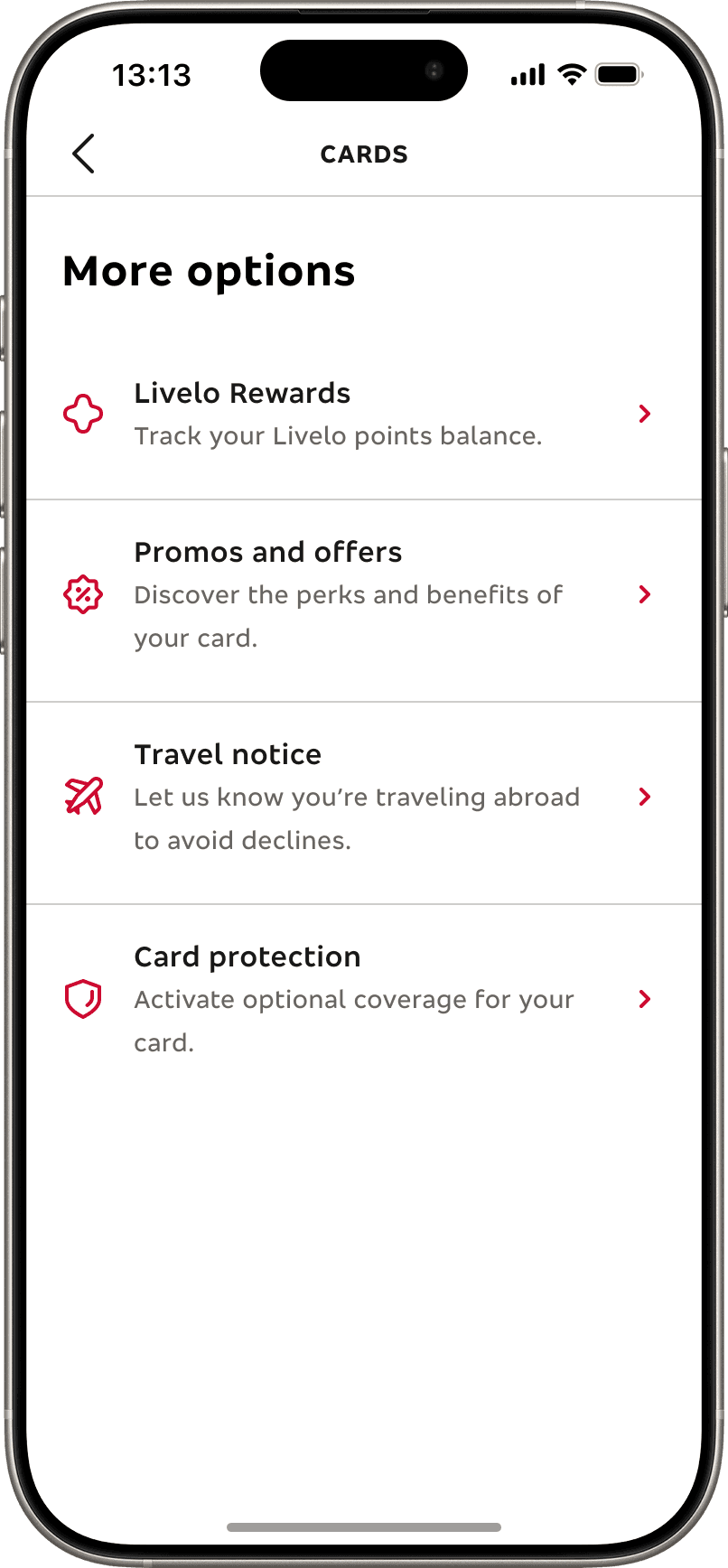
Card protection

Debt plans

Dispute charge

Due date

Extra card

Freeze card

Livelo Rewards

Notifications

Password

Pay method

Promos and offers

Replace card

Split bills

Tap to pay

Travel notice

Virtual card

B2K mapped features included

Apple Pay

Bill details

Card info

Card limits

Card protection

Debt plans

Dispute charge

Due date

Extra card

Freeze card

Livelo Rewards

Notifications

Password

Pay method

Promos and offers

Replace card

Split bills

Tap to pay

Travel notice

Virtual card

In current Bradesco apps, cards are displayed through a carousel… a pattern that works for 1–2 cards but easily breaks in a multi-card reality.

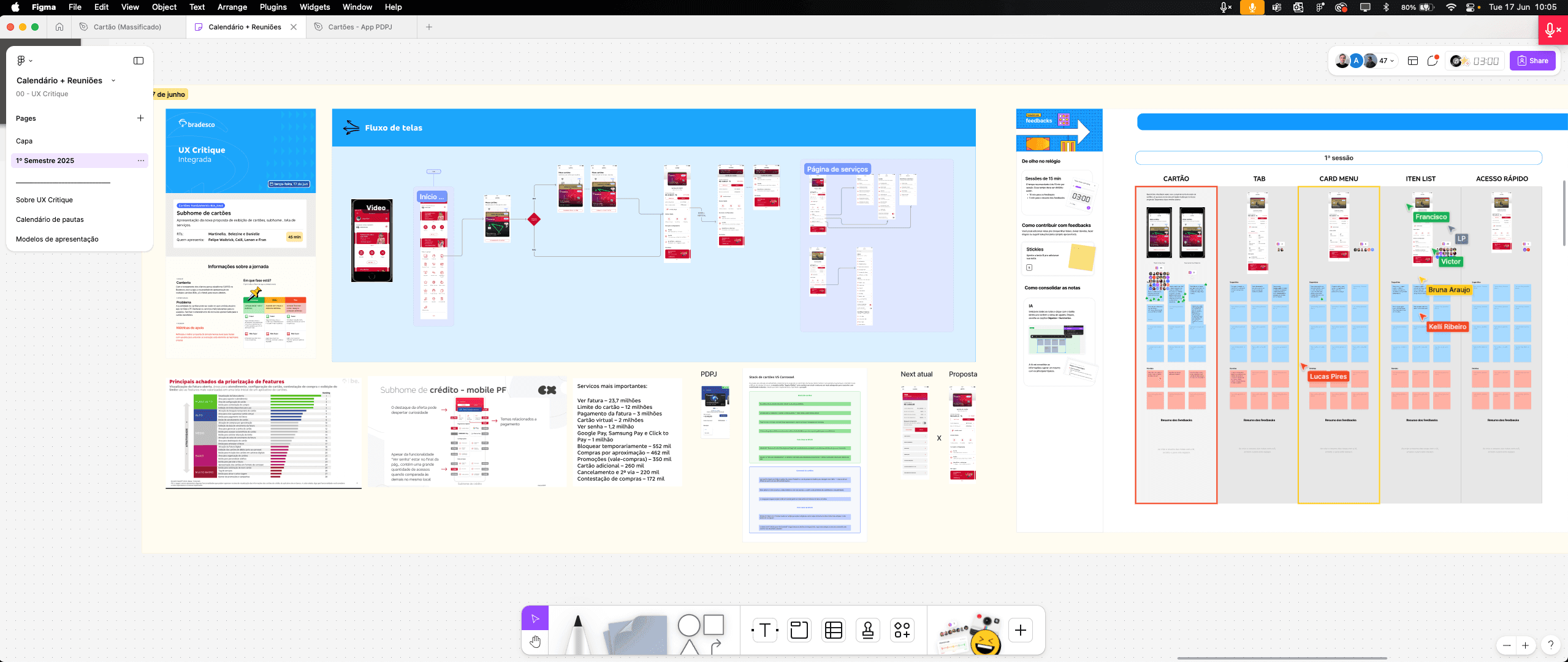
To understand how cards were displayed across Bradesco’s ecosystem, I conducted an internal benchmarking study of the main apps — Bradesco app, Bradesco Cards, Bradesco Business Cards, and PDPJ. Except for Next, which always has only one card, all of them used a carousel layout to display cards.

Bradesco App

Bradesco Cards

PDPJ

Next Banking

Among all mapped issues, the carousel pattern stood out the most. While it worked reasonably well in apps with just two or three cards, I knew it wouldn't scale for Bradesco_Next due to several problems, such as:

Scalability issues

01

Navigating 5–6 cards requires too many swipes, increasing cognitive load.

Low discoverability

02

Cards are often hidden off-screen, leading to high miss-click and abandonment rates.

Accessibility concerns

03

Swipe-only interactions are harder for users with motor impairments.

Inconsistent behavior

04

Switching between cards becomes unpredictable as the number grows.

No clear hierarchy

05

All cards look “the same” in the carousel, making it harder to prioritize the most relevant one.

Performance limitations

06

All cards and their data load at once as soon as the user enters the card area, which can cause slowdowns due to multiple calls and heavy request.
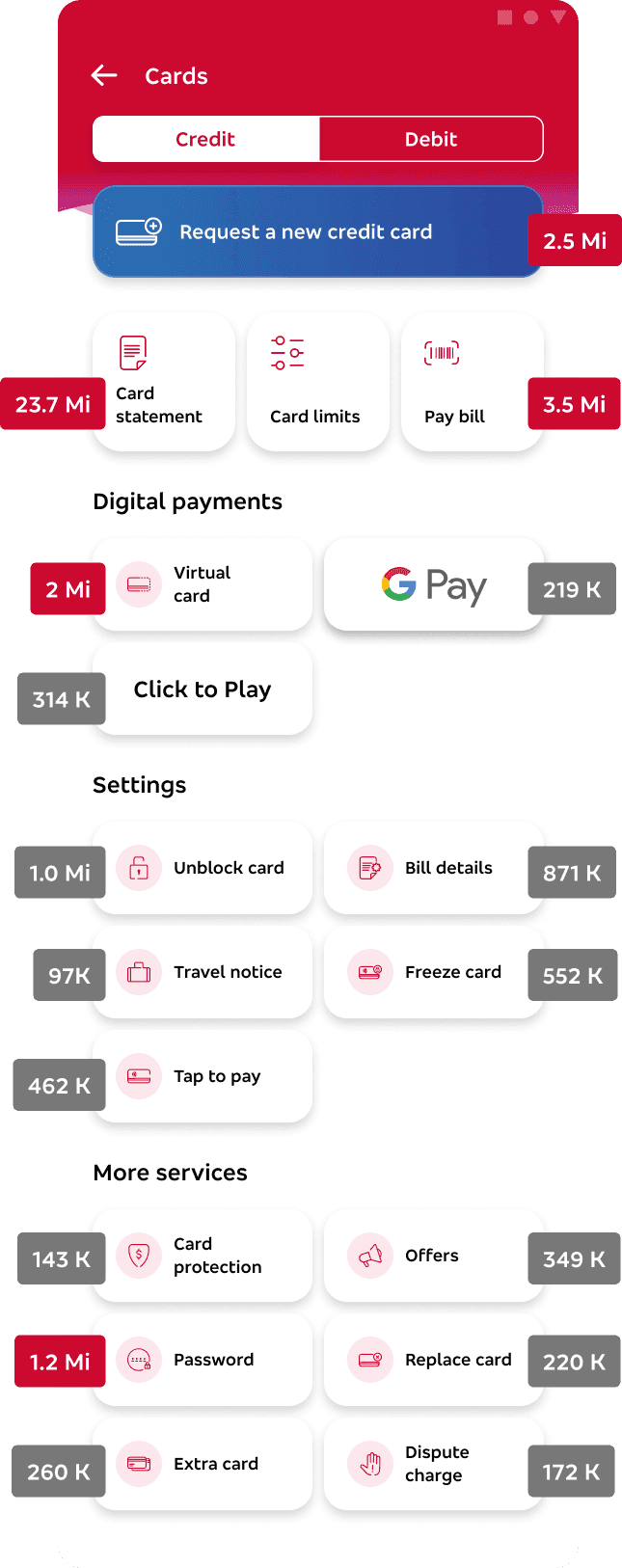
A breakdown of the most accessed features in march 2025 confirmed how people truly use their cards

In addition to qualitative insights, I partnered with the CX Metrics team to analyze real user behavior. By tracking millions of sessions from March 2025, we identified the most frequently accessed features — giving us a data-backed view of how customers engage with their cards in real scenarios.

A breakdown of the most accessed features in march 2025 confirmed how people truly use their cards

In addition to qualitative insights, I partnered with the CX Metrics team to analyze real user behavior. By tracking millions of sessions from March 2025, we identified the most frequently accessed features — giving us a data-backed view of how customers engage with their cards in real scenarios.

02 — DEFINE

Combining these insights allowed me to prioritize key actions and structure the experience — but I still needed to determine how to present multiple cards. That meant looking beyond our ecosystem into broader industry practices through benchmarking and desk researching.
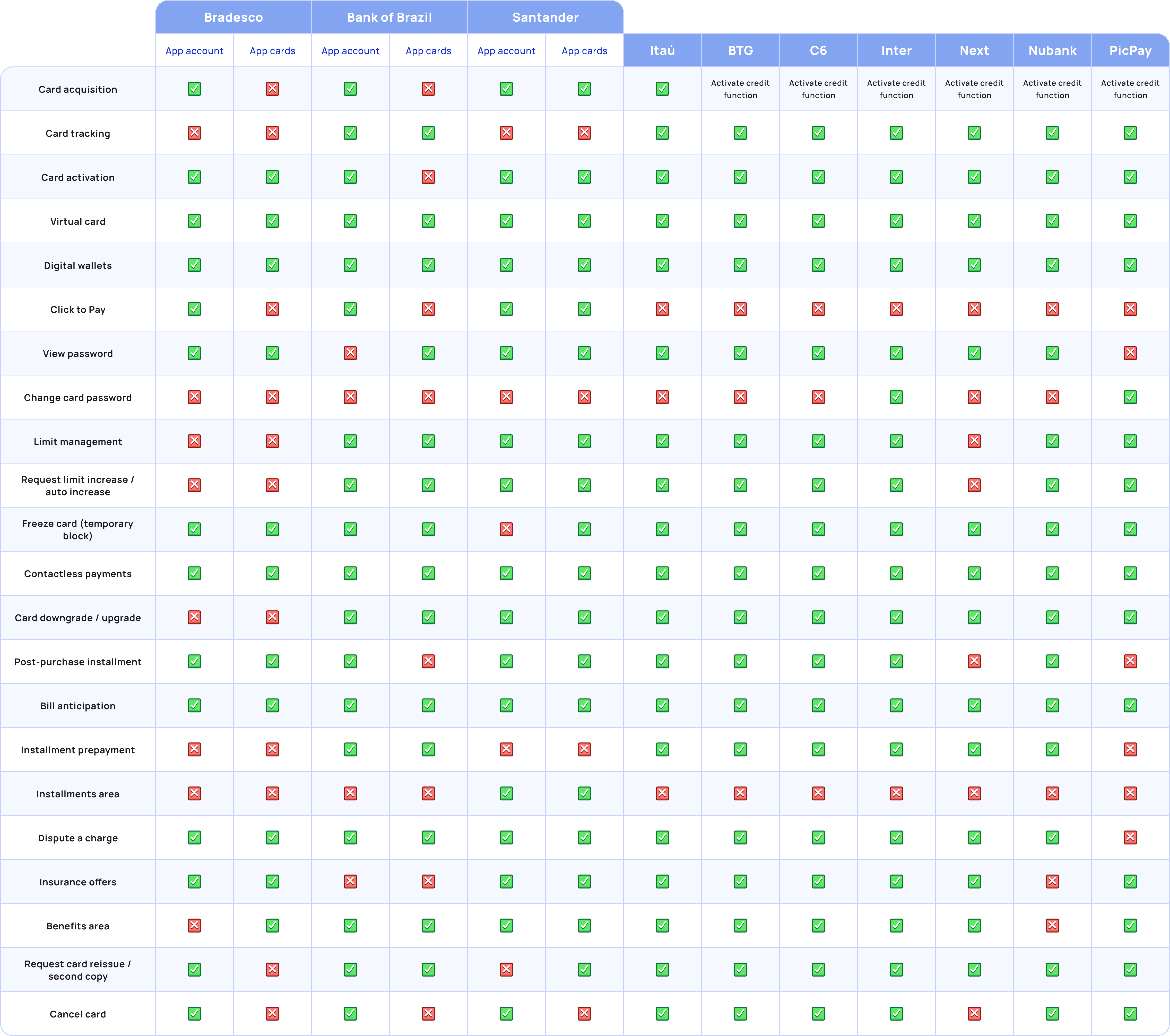

Through this analysis I was able to compare how major banks structure their features, what services they offer, and how they prioritize them in the interface. Most banks still rely on carousel navigation, but even they face discoverability and scalability issues in complex multi-card scenarios.

Through this analysis I was able to compare how major banks structure their features, what services they offer, and how they prioritize them in the interface. Most banks still rely on carousel navigation, but even they face discoverability and scalability issues in complex multi-card scenarios.

To go beyond banking patterns, I studied how digital wallets handle multi-card environments.

Wallets offered valuable insights into interaction design at scale. Understanding how these products solve navigation, hierarchy, and performance challenges helped validate my design direction and inspired solutions for Bradesco_next. I was strongly convinced of it's key industry signals that highlight their global impact

To go beyond banking patterns, I studied how digital wallets handle multi-card environments.

Wallets offered valuable insights into interaction design at scale. Understanding how these products solve navigation, hierarchy, and performance challenges helped validate my design direction and inspired solutions for Bradesco_next. I was strongly convinced of it's key industry signals that highlight their global impact

0B

0B

Digital wallet users worldwide (2024).

0%

0%

Projected user growth to 5.8B by 2029.

0%

0%

Transactions via digital wallets (2024).

0B

0B

Digital wallet users worldwide (2024).

0%

0%

Projected user growth to 5.8B by 2029.

0%

0%

Transactions via digital wallets (2024).

Google Pay

Carousel navigation

Uses a horizontal carousel, meaning each card is accessed sequentially — a model that works well for few cards but scales poorly when many are present.

Samsung Pay

Horizontal swipe model

Cards appear side by side and the user scrolls horizontally to select one. It’s simple and familiar, but offers limited visibility and requires more gestures as card count grows.

Apple Pay

Stack-based, direct selection

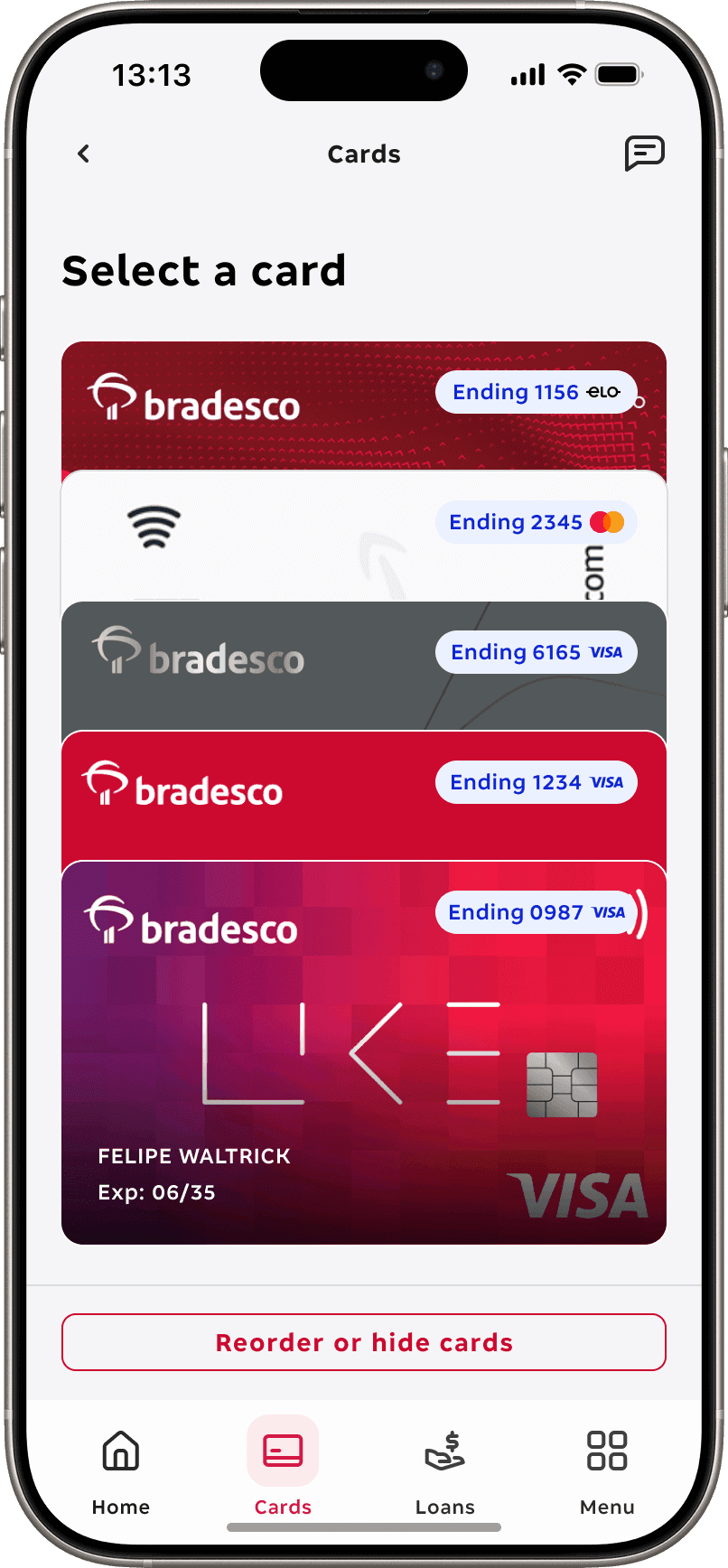
Apple organizes multiple cards in a layered stack, allowing users to view and access them instantly without swiping through each one. This pattern was the first I found that felt truly scalable and efficient for a multi-card environment.

Google Pay

Carousel navigation

Uses a horizontal carousel, meaning each card is accessed sequentially — a model that works well for few cards but scales poorly when many are present.

Samsung Pay

Horizontal swipe model

Cards appear side by side and the user scrolls horizontally to select one. It’s simple and familiar, but offers limited visibility and requires more gestures as card count grows.

Apple Pay

Stack-based, direct selection

Apple organizes multiple cards in a layered stack, allowing users to view and access them instantly without swiping through each one. This pattern was the first I found that felt truly scalable and efficient for a multi-card environment.

It became the foundation for my design approach — the starting point for building the bradesco_next prototype and shaping how users would experience multiple cards for the very first time.

All the initial research led to one central hypothesis: a stack-based solution would deliver the most effective experience — reducing friction, improving usability, and ultimately proving that, while disruptive at first, it’s exactly what Bradesco’s ecosystem needs.

At this stage, my role shifted from research to experimentation — translating these insights into a working prototype and validating whether my design hypotheses would hold true with real users. Each decision was driven by assumptions built from research, user feedback, and data. Before any testing, I believed this approach could significantly improve overall experience.

Fewer gestures & better navigation

Users can instantly access any card without swiping endlessly.

Improved accessibility

Higher visibility, clearer focus states, and more intuitive navigation for screen readers and cognitive accessibility.

According to WCAG 2.1.1, 2.1.2 and 1.3.1

Visual recognition at a glance

Layered structure allows users to identify cards quickly without needing to scroll.

Fewer gestures & better navigation

Users can instantly access any card without swiping endlessly.

Improved accessibility

Higher visibility, clearer focus states, and more intuitive navigation for screen readers and cognitive accessibility.

According to WCAG 2.1.1, 2.1.2 and 1.3.1

Visual recognition at a glance

Layered structure allows users to identify cards quickly without needing to scroll.

Performance benefits

Only the selected card loads its services — avoiding unnecessary backend requests and speeding up load times.

Greater personalization

Users can reorder cards based on priority or hide those they don’t use, creating a tailored experience.

Future-proof for Open Finance

As Brazil’s Open Finance expands, users will be able to connect external banks cards — automatically integrated into the stack without breaking UI logic or layout.

Performance benefits

Only the selected card loads its services — avoiding unnecessary backend requests and speeding up load times.

Greater personalization

Users can reorder cards based on priority or hide those they don’t use, creating a tailored experience.

Future-proof for Open Finance

As Brazil’s Open Finance expands, users will be able to connect external banks cards — automatically integrated into the stack without breaking UI logic or layout.

03 — IDEATE

Selected card

Once a card is selected, users access a focused environment where all key actions are grouped in a single, consistent flow.

We reorganized information architecture to reduce friction, prioritize the most frequent tasks, and create a more intuitive hierarchy for day‑to‑day use. Below, you can see how the screen was structured and the rationale behind each section.

03 — IDEATE

Selected card

Once a card is selected, users access a focused environment where all key actions are grouped in a single, consistent flow.

We reorganized information architecture to reduce friction, prioritize the most frequent tasks, and create a more intuitive hierarchy for day‑to‑day use. Below, you can see how the screen was structured and the rationale behind each section.

01

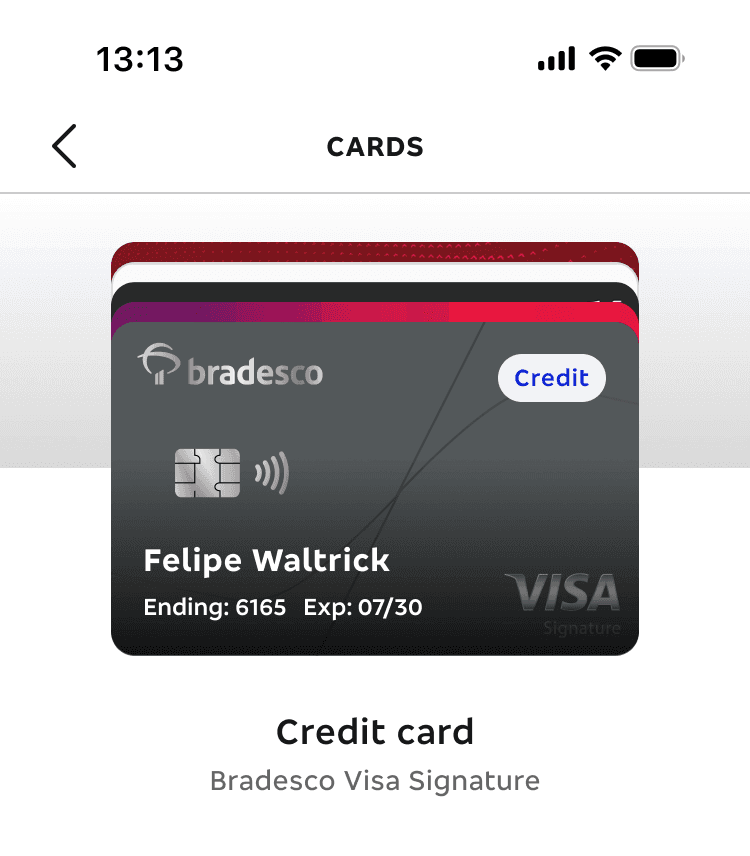
Card art

We created the card identification as real as posible, adding the tags Credit or Debit, the ending numbers and expiration date. Below the cards, there's the name of the product and it's category.
02

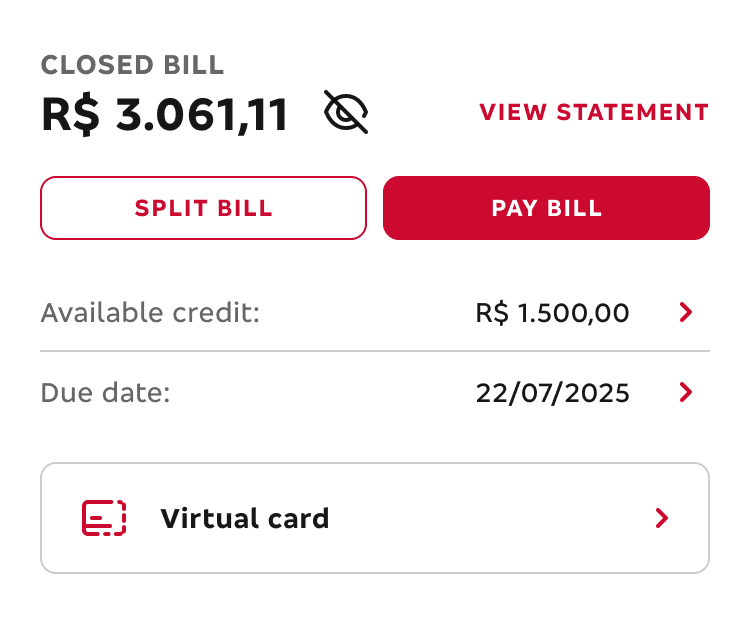
Top priorities

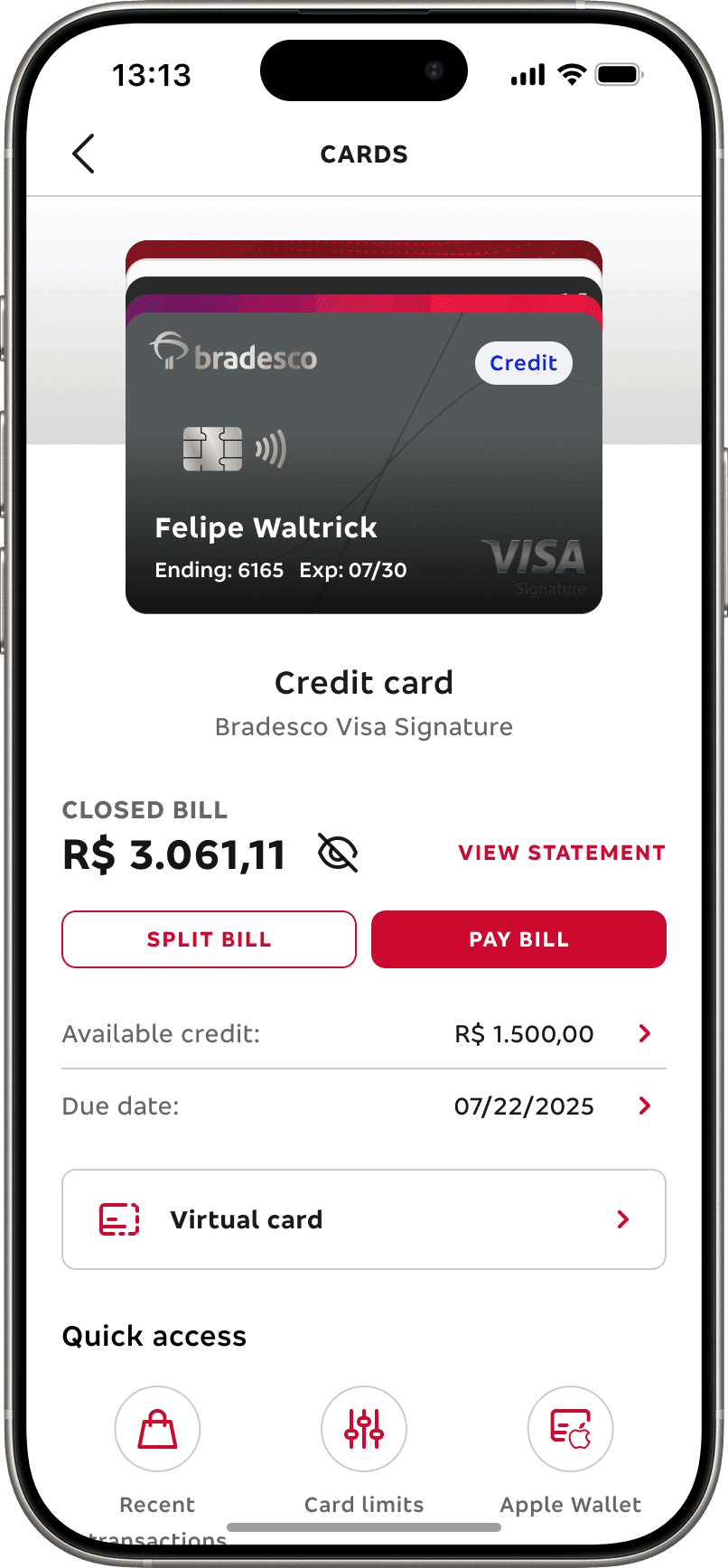
At the top, we prioritized the most critical tasks — such as viewing and paying the bill, checking limits, and monitoring due dates — alongside clear card identification and product details. These actions were placed here based on research insights and frequency of use, aiming to reduce friction and speed up daily routines.
03

Quick access and new menu

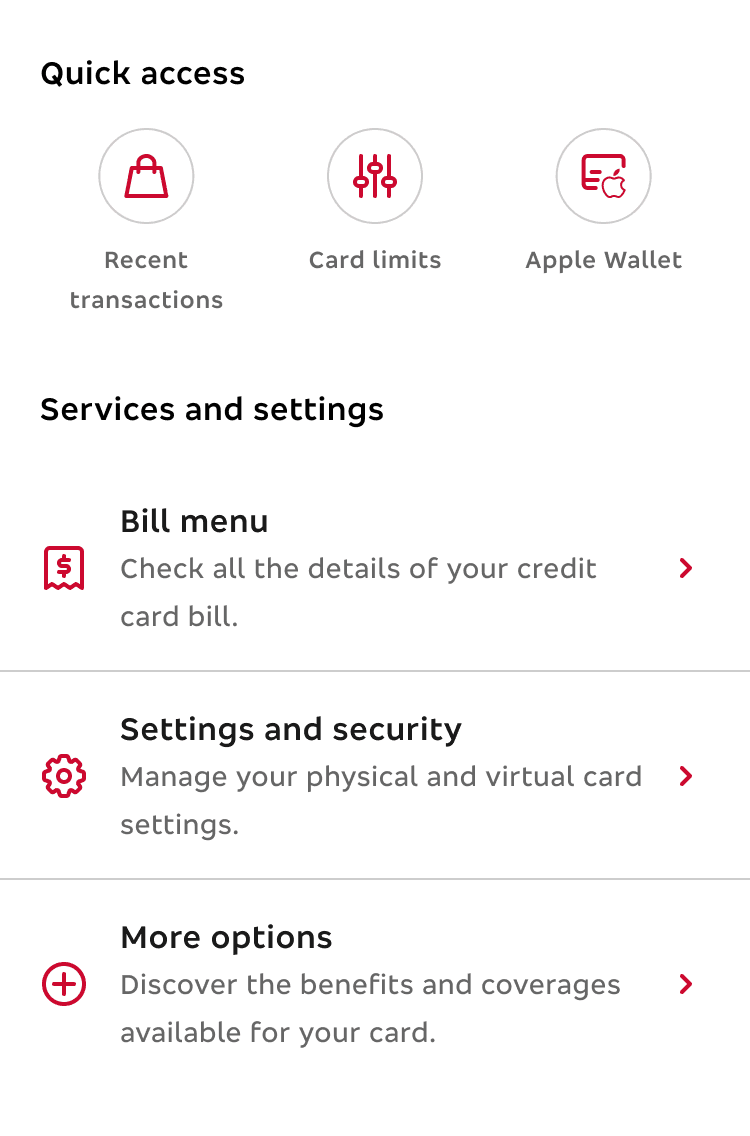
In the center, users can access key features faster with a three-item quick-access area and a reorganized service hub split into Billing, Security & Settings, and More options. This structure was designed to simplify navigation and help users locate what they need without cognitive overload
04

Offers and engagement

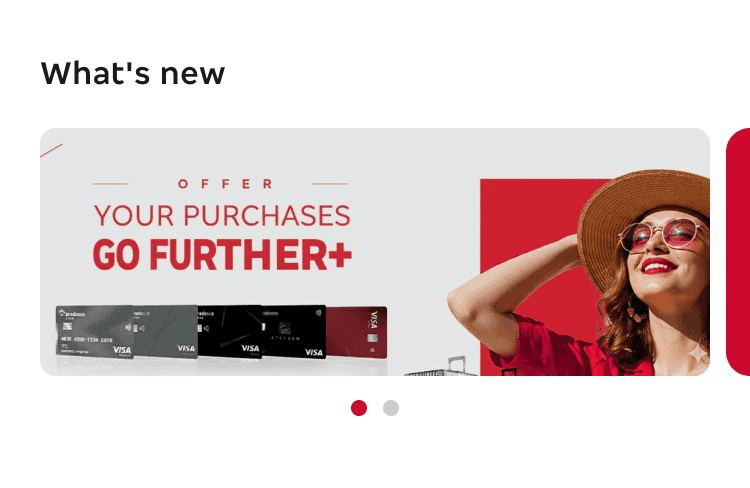
At the bottom, a dynamic carousel highlights promotions, product suggestions, and personalized offers. This section was created to test engagement opportunities and validate how CRM content can coexist with essential tasks without disrupting the primary flow.
Card menu organization

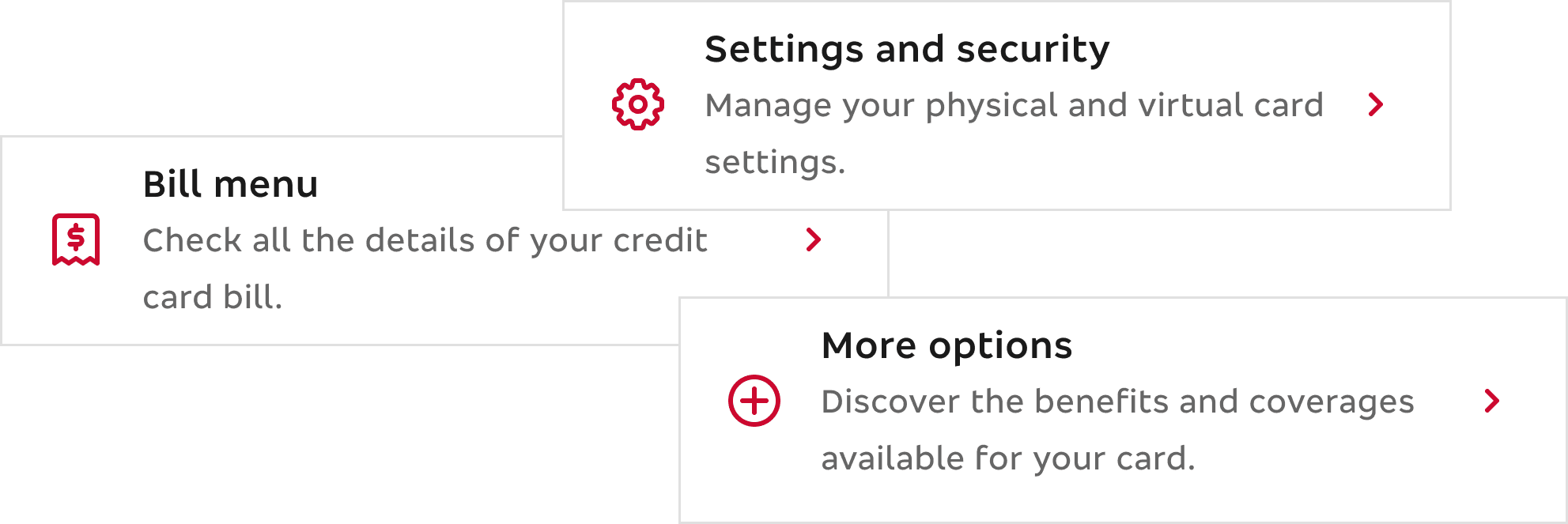
We tried a new menu structure with three grouped categories

Unlike current Bradesco apps that present a flat list, we organized services into three menus to test whether a grouped hierarchy would improve discoverability.

Card menu organization

We tried a new menu structure with three grouped categories

Unlike current Bradesco apps that present a flat list, we organized services into three menus to test whether a grouped hierarchy would improve discoverability.

A/B Testing

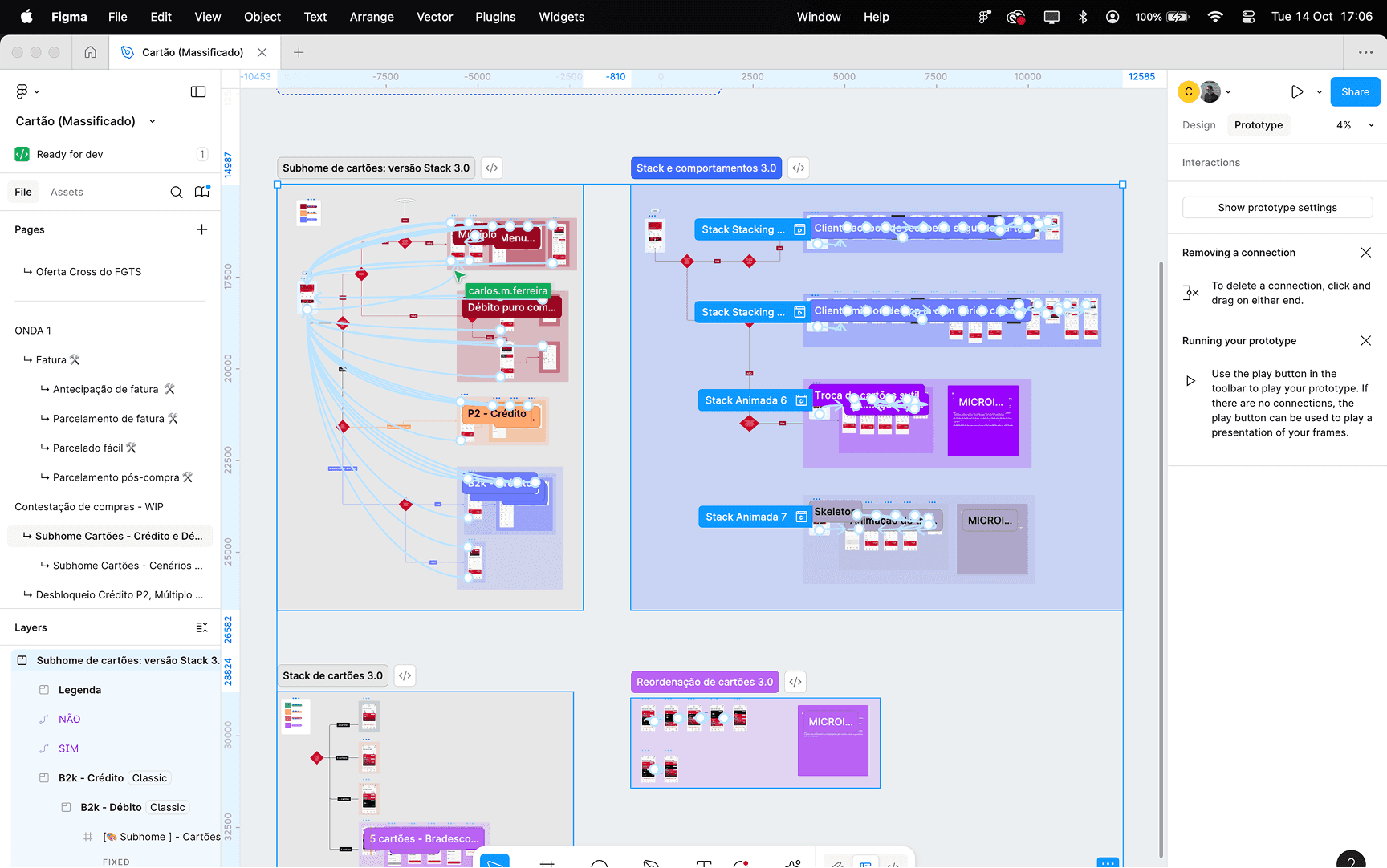
Since this was a major shift in design and experience, we tested Carousel vs. Stack with real users.

Even though we strongly believed in the stack layout from the start, we pursued a more concrete validation through UX Research.

A/B Testing

Since this was a major shift in design and experience, we tested Carousel vs. Stack with real users.

Even though we strongly believed in the stack layout from the start, we pursued a more concrete validation through UX Research.

VS

Carousel VS Stack

04 — TEST

After building and refining our initial hypotheses, it was time to put everything to the test with real users
Qualitative research

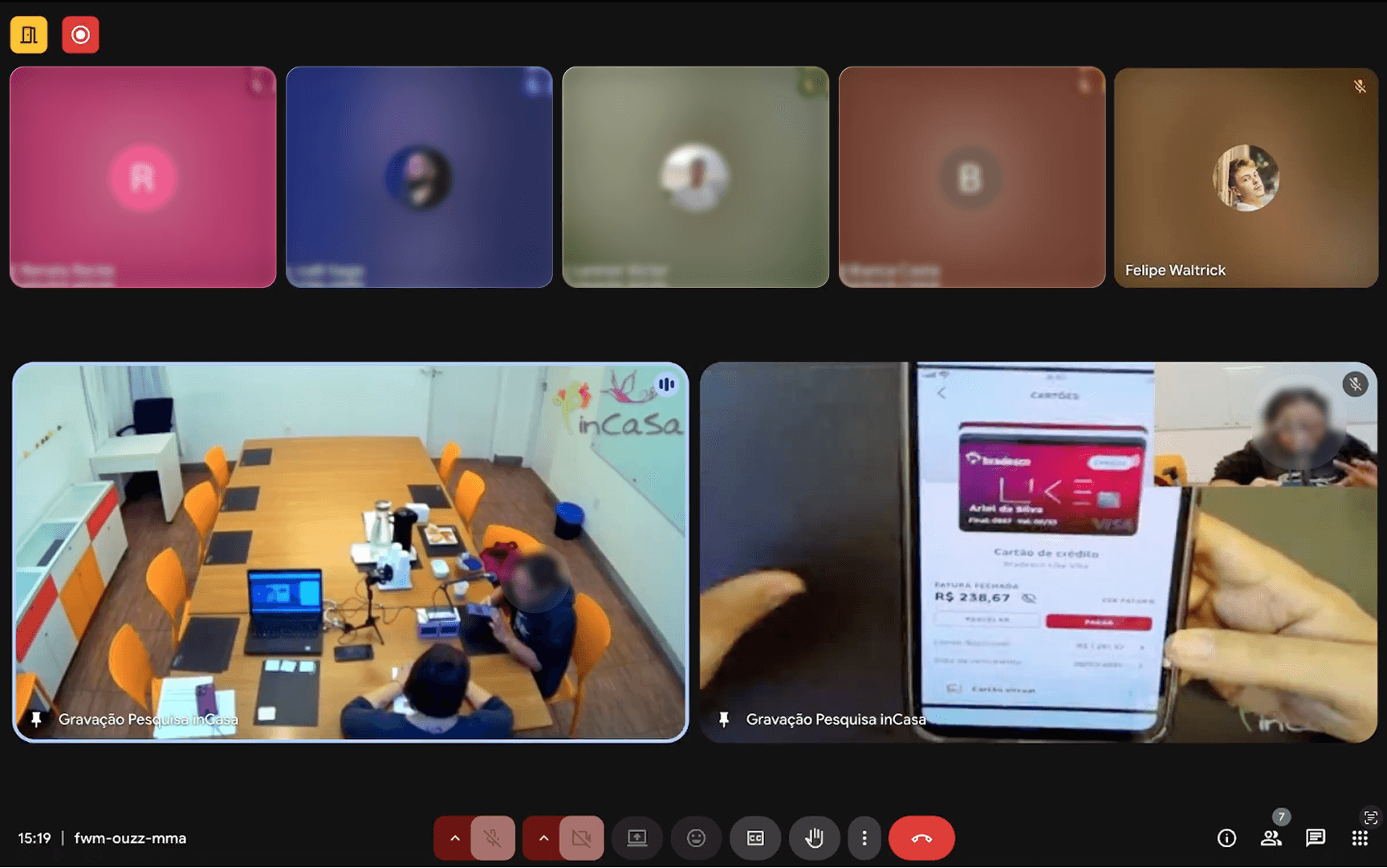
We focused on observing real interactions and identifying usability frictions. Through individual testing sessions, we were able to capture user reactions, expectations, and mental models while performing core tasks in both Stack and Carousel flows.

We focused on observing real interactions and identifying usability frictions. Through individual testing sessions, we were able to capture user reactions, expectations, and mental models while performing core tasks in both Stack and Carousel flows.

Goal

Understand users’ perception of the new cards area and its usability — evaluating the Stack, Carousel, and freeze card flows.

Goal

Understand users’ perception of the new cards area and its usability — evaluating the Stack, Carousel, and freeze card flows.

Methodology

Exploratory interviews combined with card sorting to validate perceptions and map intuitive organization within the new cards area.

Methodology

Exploratory interviews combined with card sorting to validate perceptions and map intuitive organization within the new cards area.

Sample

15 Bradesco clients, including 7 from Bradesco and Bradesco Cards apps, 5 from Next, and 3 participants with accessibility limitations

Sample

15 Bradesco clients, including 7 from Bradesco and Bradesco Cards apps, 5 from Next, and 3 participants with accessibility limitations

Quantitative research

Conducted to validate insights at scale. Surveys and behavioral metrics from 463 participants helped measure success rates, abandonment, and perceived ease — revealing clear patterns behind user performance.

Conducted to validate insights at scale. Surveys and behavioral metrics from 463 participants helped measure success rates, abandonment, and perceived ease — revealing clear patterns behind user performance.

Goal

Measure user perception of Bradesco_Next’s cards experience, focusing on journey fluency and comparing Stack vs Carousel formats.

Goal

Measure user perception of Bradesco_Next’s cards experience, focusing on journey fluency and comparing Stack vs Carousel formats.

Methodology

Unmoderated usability test to observe real product use and analyze navigation, behavior, task success, and completion time.

Methodology

Unmoderated usability test to observe real product use and analyze navigation, behavior, task success, and completion time.

Sample

Stack and Carousel versions were tested separately with 463 participants — 233 users from the Next app and 230 from the Bradesco and Bradesco Cards apps.

Sample

Stack and Carousel versions were tested separately with 463 participants — 233 users from the Next app and 230 from the Bradesco and Bradesco Cards apps.

01

Setting up the test

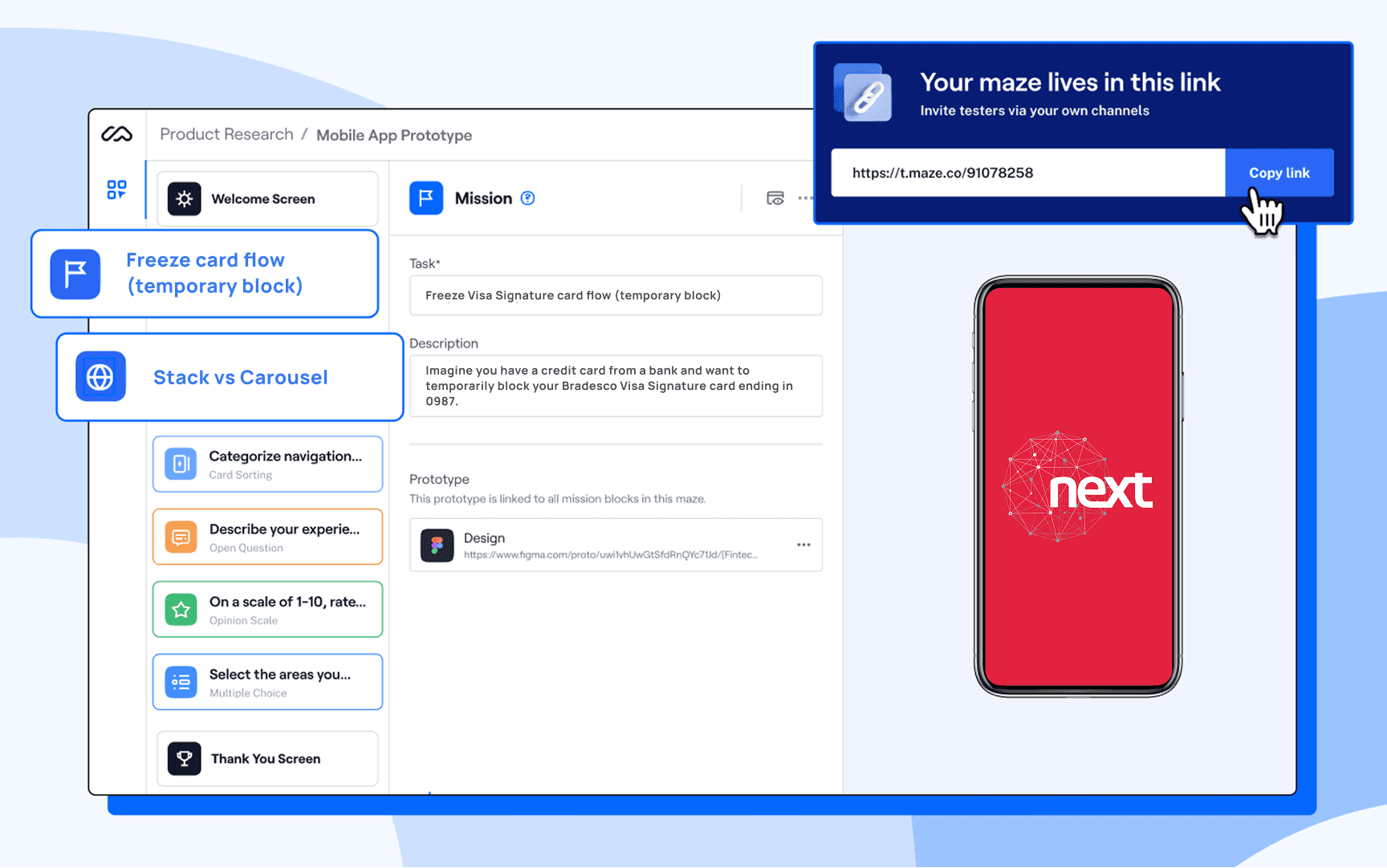
A fully navigable prototype was built in Maze to simulate real user interactions inside the Bradesco Next experience

02

The task

Participants were asked to access the card area, select the Visa Signature card and perform a temporary block (Freeze card).

03

Results analysis

We analyzed Maze performance metrics, clicks, completion rates, and error patterns — to validate our initial hypotheses and uncover new usability opportunities.

01

Testing Carousel VS Stack

01

Testing Carousel VS Stack

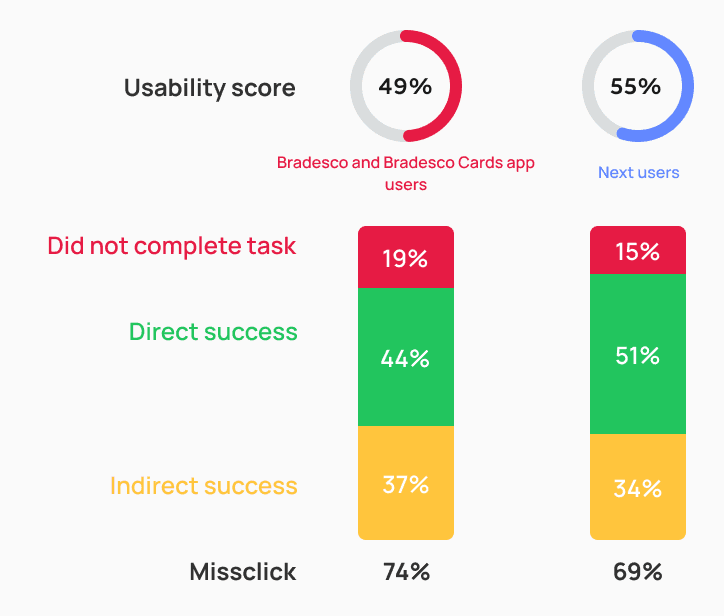
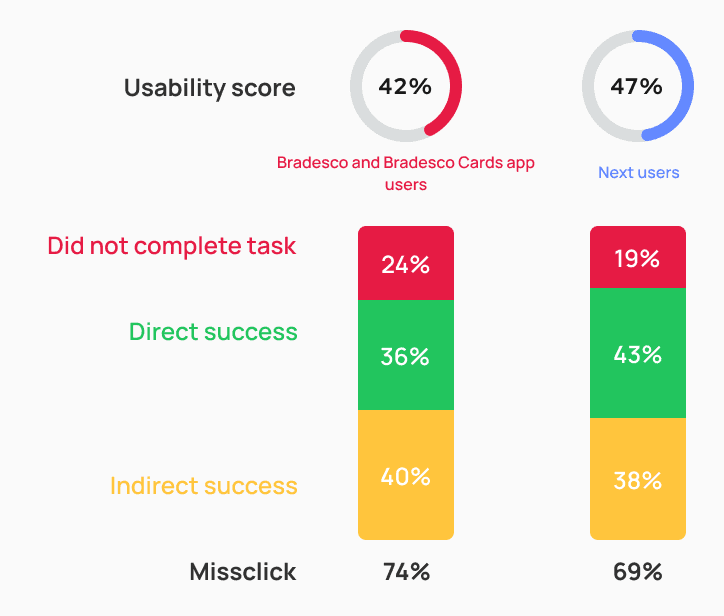
Usability score

Both prototypes were affected by indirect task completion and misclick rates — but the carousel version showed significantly higher abandonment and error levels.

This suggests that users faced more friction and demonstrated lower tolerance when dealing with a larger number of cards in the carousel format.

STACK
CAROUSEL
SCREEN BY SCREEN - STACK
SCREEN BY SCREEN - CAROUSEL
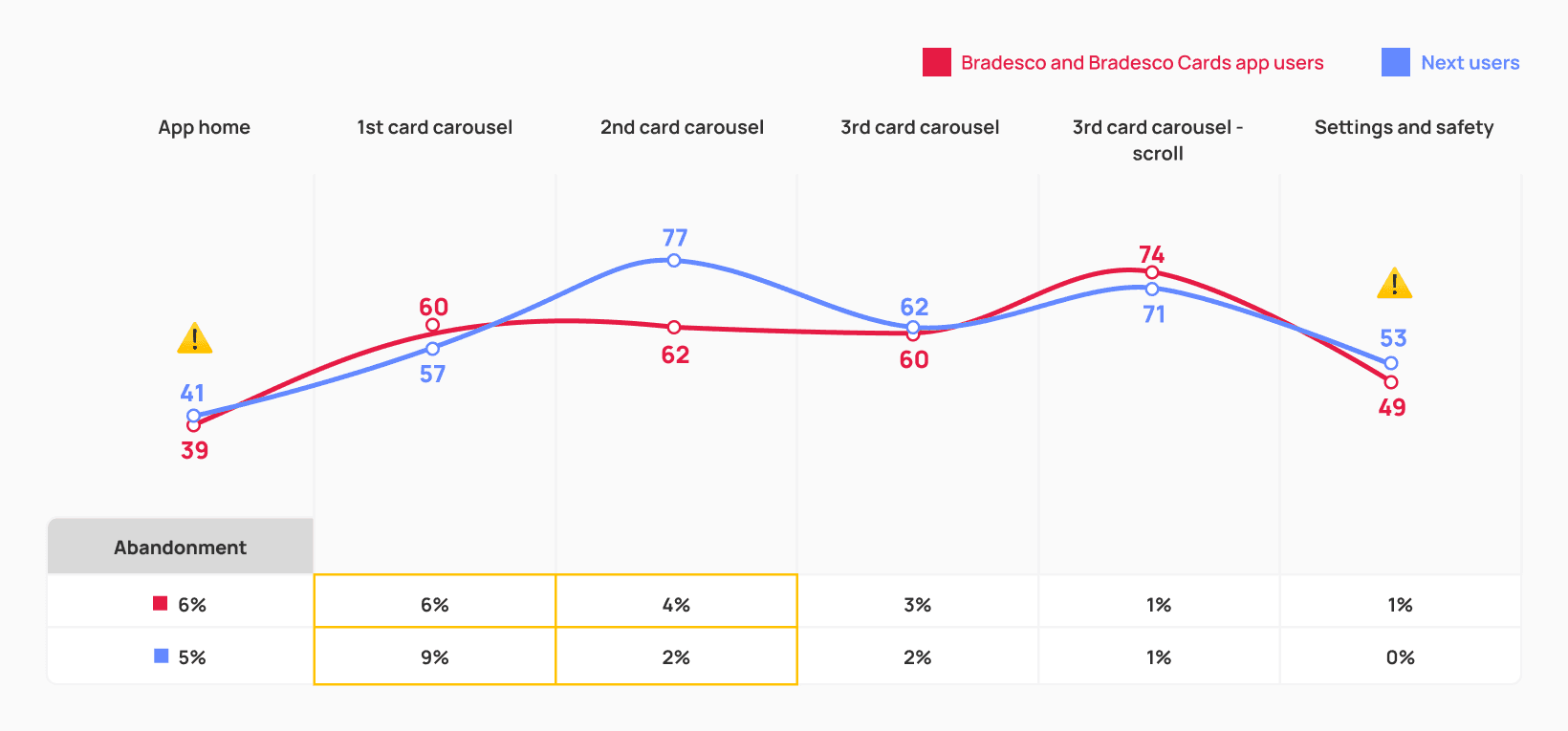
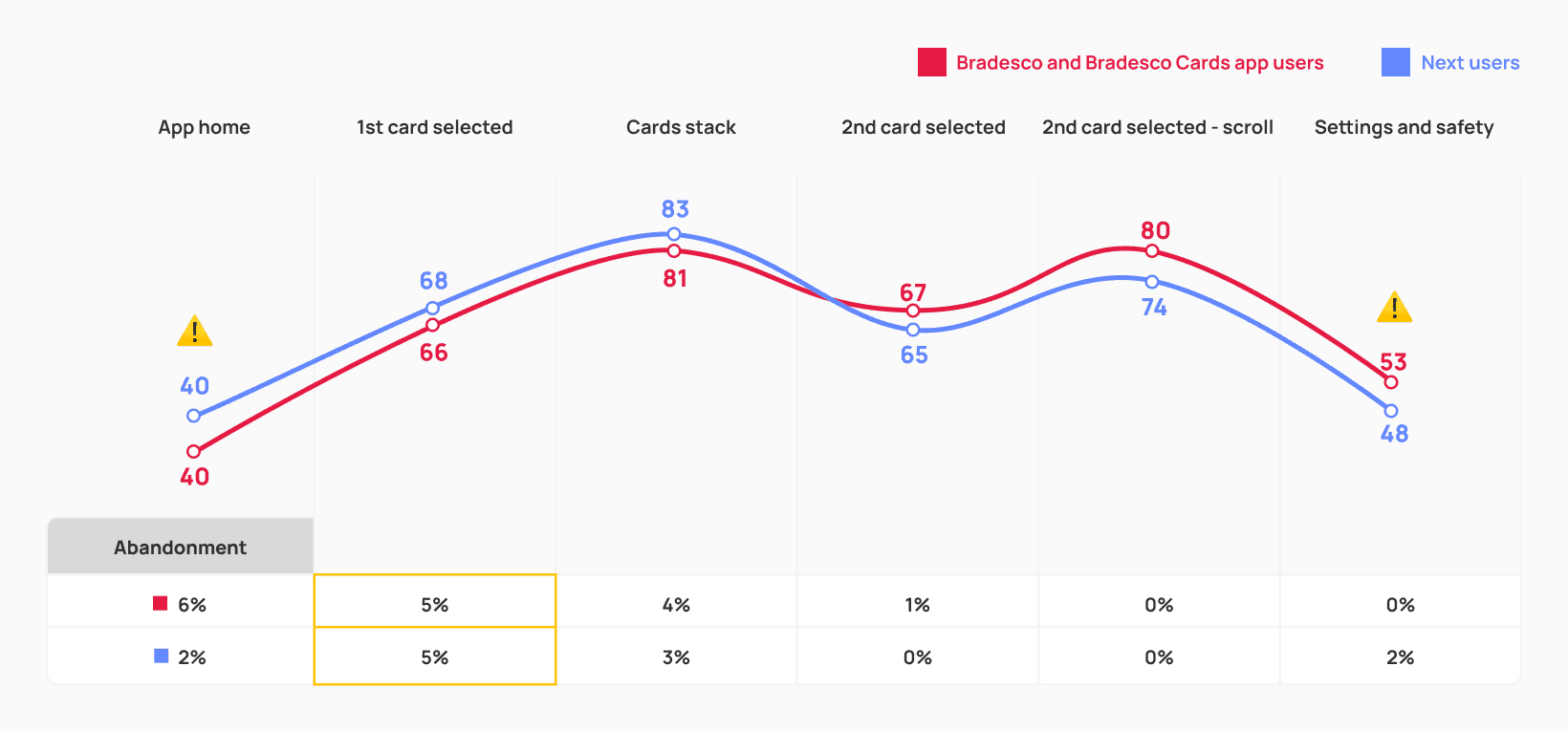
Both versions revealed the highest friction on the home and settings & security screens — indicating that the Cards feature is hard to locate and the settings menu remains confusing.

Accessibility tests also showed that while each format addresses different issues, the stack layout still needs refinement to better support users with visual limitations.

STACK

STACK

The stack design performed better for people with motor limitations, as it required less precision when interacting and reduced the effort needed for swipe gestures during navigation.

CAROUSEL

CAROUSEL

The carousel design was preferred by people with low vision, as it improved readability and matched patterns they were already familiar with in other banking apps.

02

Stack visibility

The main action taken by participants when attempting to select the card for the temporary block was directly tapping on the stacked cards, showing that the interaction was largely understood.

This was also one of the screens with the highest abandonment rates (5%), suggesting that discoverability and guidance still need improvement to help users confidently access the full card stack.

Usability score

66

Missclick rate

58%

Abandonment rate

5%

Average click time

3s
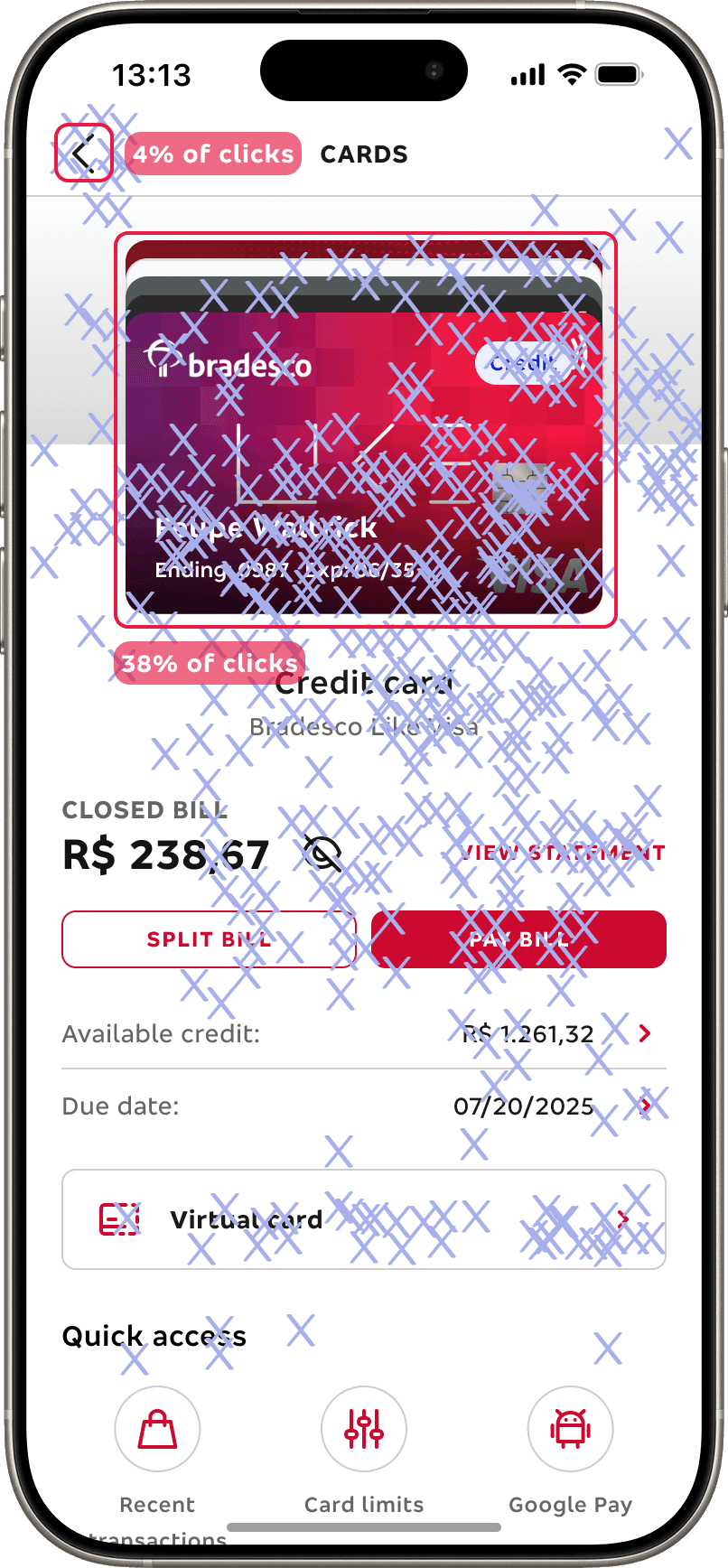
Key insights

  • The high missclick rate indicates that many users struggled to locate the correct interaction point. Still, when participants clicked correctly, they did so in just 3 seconds on average, showing that the interaction can be fast and efficient once understood.

  • The back button in the header was rarely used (4%), reinforcing that users did not perceive it as a primary navigation path in this context.

  • Those who had never interacted with a stacked layout before reported difficulty understanding how to engage with it — especially in the absence of clear visual cues or guidance.

Key insights

  • The high missclick rate indicates that many users struggled to locate the correct interaction point. Still, when participants clicked correctly, they did so in just 3 seconds on average, showing that the interaction can be fast and efficient once understood.

  • The back button in the header was rarely used (4%), reinforcing that users did not perceive it as a primary navigation path in this context.

  • Those who had never interacted with a stacked layout before reported difficulty understanding how to engage with it — especially in the absence of clear visual cues or guidance.

I've never used this format before. I liked it, but did you notice how I kind of struggled interacting?

I believe that a horizontal layout would be more practical — just swiping to the side instead of clicking like this. But I guess I like it.

T.S., 45 years

Office Assistant, São Paulo/SP — participant with visual accessibility needs

03

Stack interaction

Card visibility and ordering preferences

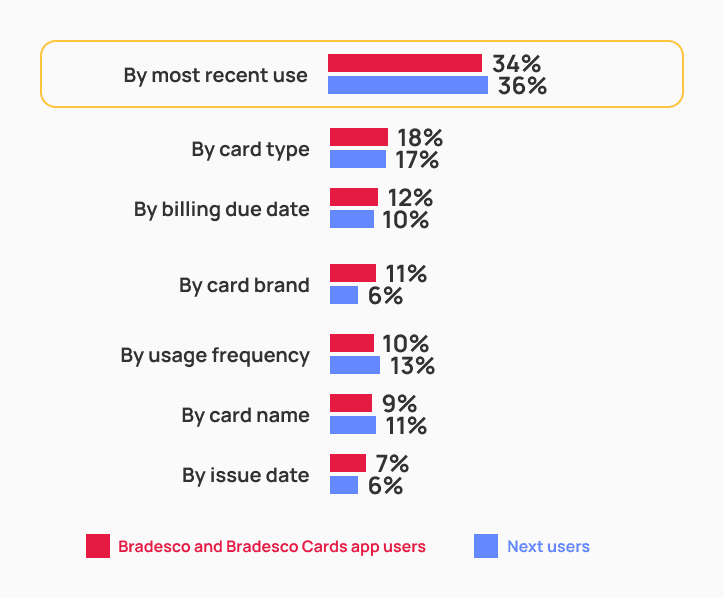
Contrary to our initial assumption — that users would prefer the card with the highest spending to open automatically — testing revealed they actually expect the last accessed card to appear by default.

Most participants also expressed a desire to see all cards in the stack regardless of status or frequency of use, and to have them ordered by recent usage, starting with the most frequently used.
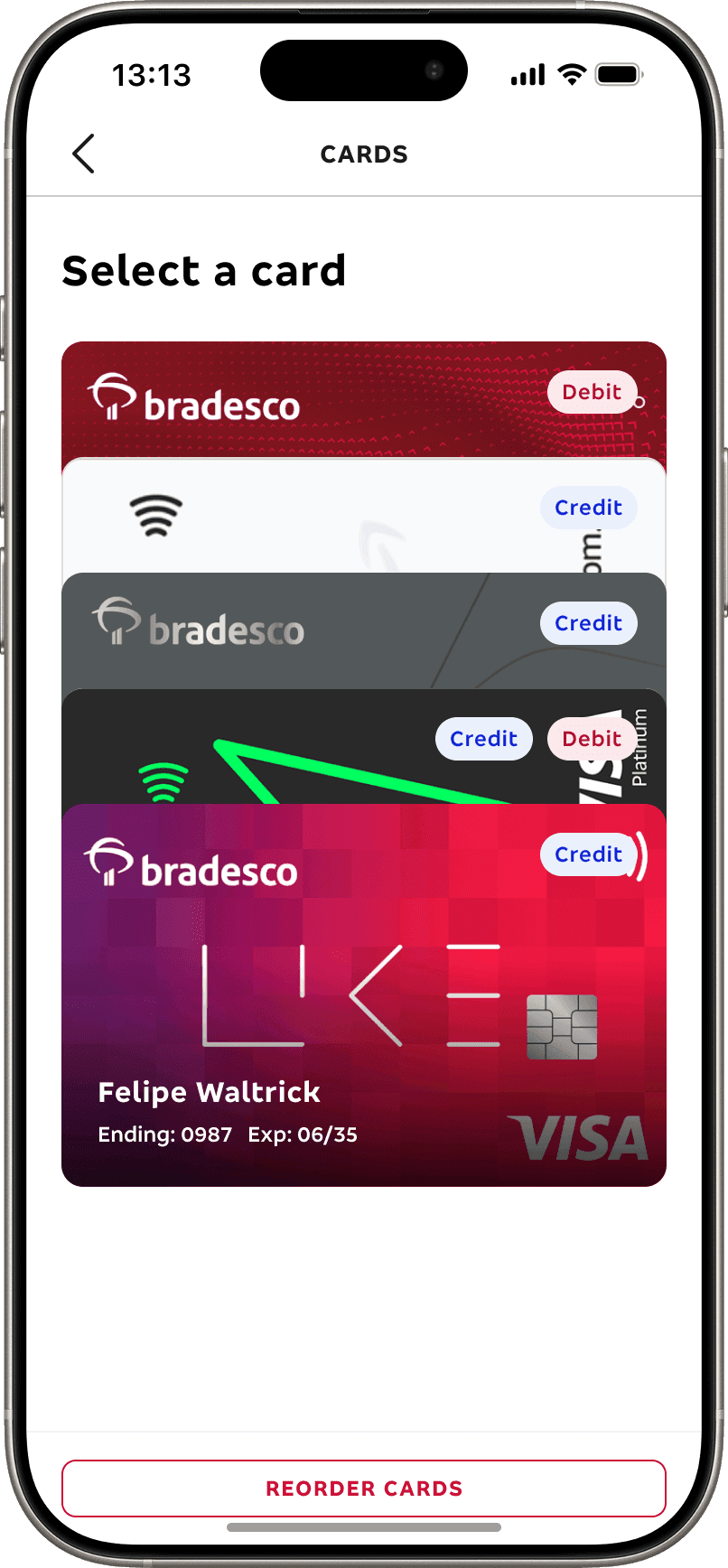
Which cards did you expect to find on this screen?
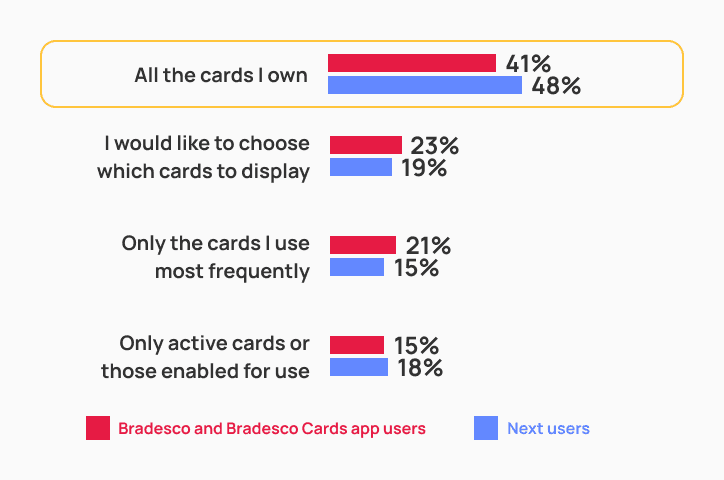
How would you like the cards to be organized on the screen?
Interpretation and clarity challenges

The “Sort Cards” button caused confusion: some users expected to manually reorder cards, while others didn’t understand its purpose — showing the need for clearer naming and communication.

04

Cards identification

Ease of use and card identification

When asked about the ease of switching between cards, more than half of participants described the process as simple and intuitive.

Those who struggled mentioned difficulty distinguishing one card from another — especially when visual cues were too subtle.

How would you rate the ease of switching between the cards you wanted to view — and, for those who found it difficult, what were the main reasons?
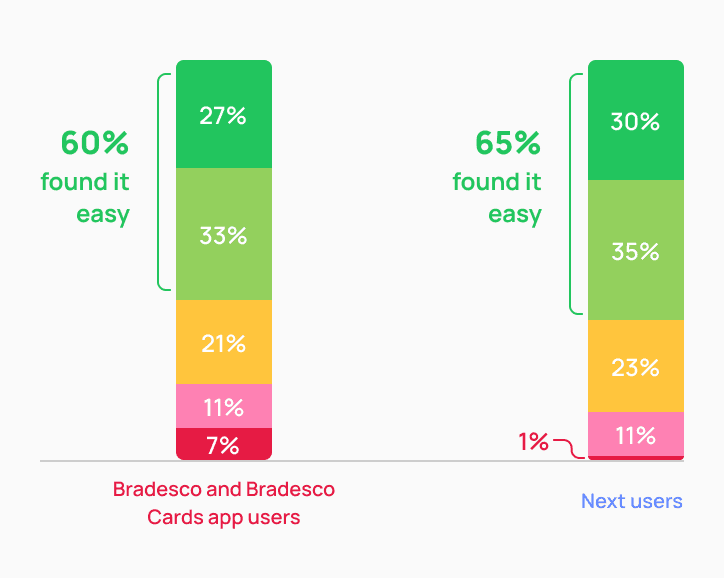
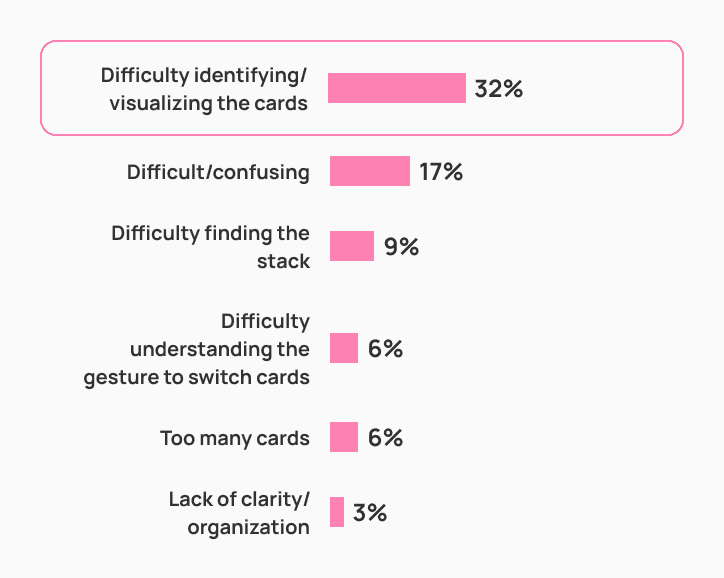
Very easy

Easy

Neutral

Difficult

Very difficult

Accessibility insights

Visual perception varies significantly. Most users without impairments easily noticed the credit, debit, or multi-function tags. But participants with low vision often couldn’t read them clearly or even mistook two similar-colored cards as one.

  • Terminology created confusion. The term “multi-function card” wasn’t widely understood and lacked clarity for many users.

  • Layout spacing matters. Several participants reported that cards felt too close together, especially on larger screens, which made selection more difficult.

  • Terminology created confusion. The term “multi-function card” wasn’t widely understood and lacked clarity for many users.

  • Layout spacing matters. Several participants reported that cards felt too close together, especially on larger screens, which made selection more difficult.

Based on these findings, we asked users how they preferred to identify their cards. Most of them indicated that the last four digits and the card network logo were far more meaningful than simply showing credit or debit. With these insights, we identified key areas for improvement in the next iteration

VISUAL CONTRAST

VISUAL CONTRAST

Add stronger visual contrast between cards (e.g., shadows, outlines, or extra spacing) to separate layers more clearly. Adjust the spacing dynamically based on the user’s device available height.

USE OF TAGS

USE OF TAGS

Instead of using credit, debit, or multicard tags, we could prioritize the last four digits and the card network logo as key identifiers, since research has shown that users rely on these infos the most.

05

User perceptions

Card sorting

To validate the new information architecture, we conducted a card sorting study. Users were presented with all available card-related services and asked to associate each one with one of the four proposed categories.

This helped us understand how users naturally group functionalities and identify misalignments between their mental models and the designed structure.

Categories naming

Participants grouped all items containing the term “bill” under the category “Bill Details.” Those related to security were placed under “Settings & Security.” More generic or unclear ones were assigned to “More Services.”

The “Settings” menu alone had fewer direct associations with specific features compared to “Security.” For that reason, highlighting “Security” in the label proved to be a more effective strategy for attracting user attention

Bill details

Split bills

71%

Bill details

69%

Due date

53%

Debt plans

47%

*Pay method

35%

*Dispute charge

27%

*Replace card

27%

Security

Password

65%

Freeze card

62%

Card info

45%

Card protection

44%

*Tap to pay

35%

*Dispute charge

30%

Settings

Notifications

57%

*Pay method

30%

*Tap to pay

35%

*Card limits

32%

More services

Promos and offers

76%

Livelo Rewards

68%

Extra card

58%

Digital wallets

56%

Travel notice

50%

Virtual card

48%

*Card limits

32%

*Dispute charge

30%

*Replace card

29%

*Features like “pay method, dispute charge, replace card, limits and tap to pay were associated with more than one category — revealing a lack of clarity among users when defining where these actions should be grouped.
General perceptions

Visual elements were well received, but users requested greater emphasis and legibility for key information on the Cards screen. Details such as due date and card limit were seen as essential and should have stronger visual prominence.

User suggestions

• Increase text and icon sizes to improve readability — especially for users with low vision or aged 65+.
• Visually highlight recurring information such as available limit and bill due date.
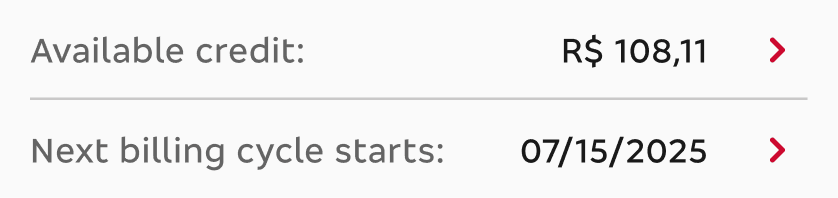
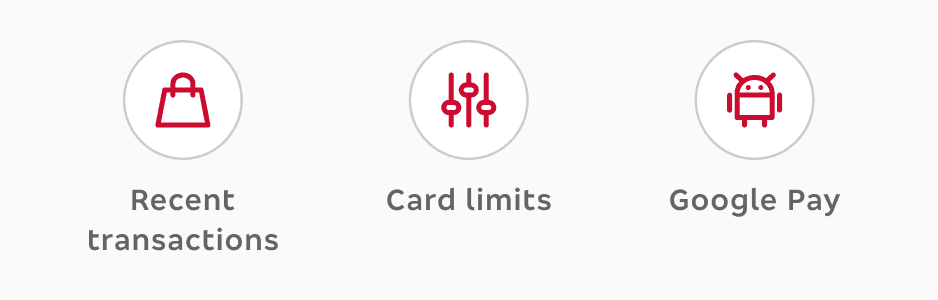
Quick access

This section was positively rated by those who noticed it, but some users didn’t recognize the area, and certain features were misunderstood or went unnoticed.
06

Menu organization

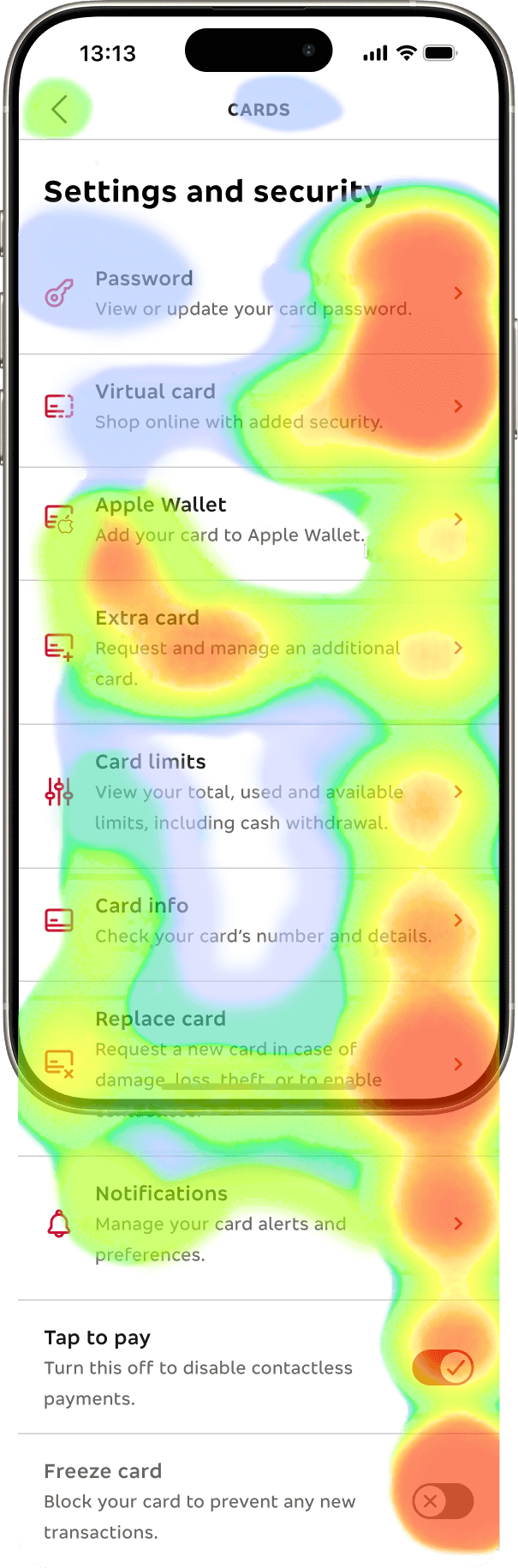
Participants had difficulty locating the freeze card (temporary lock) feature within the “Settings & Safety” menu, resulting in a misclick rate above 80%.

The menu structure itself was positively evaluated, but users suggested reorganizing items, replacing shortcuts, and adding a search bar to make access more direct.

Usability score

53

Missclick rate

81%

Abandonment rate

0%

Average click time

19s
I mean… Usually, when you need to temporarily block a card, it’s an emergency — theft, loss… the more visible, the better.

D.S., 18 years

Sales Assistant — Salvador, BA. Bradescard user

05 — REFINE

During the refinement phase, our design system received a major update, unlocking a new visual language and component library that didn’t exist in the first prototype.

The new visual direction introduced cleaner surfaces, a light‑gray background replacing pure white, thicker borders, and blue CTAs that finally expanded the interaction palette beyond red‑only actions. The home screen also received a structural update, and a dedicated bottom navigation bar was added — giving “Cards” its own prominent entry point for the first time and fixing a key discoverability issue from the earlier version.

From there, we carefully addressed pain points uncovered in the first usability test.

All feedback from the first test was categorized screen by screen and translated into targeted design improvements we wanted to validate in a second round of testing.

From there, we carefully addressed pain points uncovered in the first usability test.

All feedback from the first test was categorized screen by screen and translated into targeted design improvements we wanted to validate in a second round of testing.

Home

Users couldn’t easily find the cards area to manage their cards.

Card stack

Visual and usability challenges with the stack format.

Selected card

Functional screen, but needs better hierarchy and flow.

Card menu organization

Intuitive structure, but needed refinement for better discoverability.

Home

The homepage received structural and visual updates to enhance clarity and navigation.

01

The UI was simplified to reduce visual clutter and increase visibility of key features.

02

A new bottom navigation bar with a dedicated “Cards” entry was introduced — allowing faster access to card-related features and helping users orient themselves within the ecosystem.

Home

The homepage received structural and visual updates to enhance clarity and navigation.

01

The UI was simplified to reduce visual clutter and increase visibility of key features.

02

A new bottom navigation bar with a dedicated “Cards” entry was introduced — allowing faster access to card-related features and helping users orient themselves within the ecosystem.

Before

After

Cards stack

The card stack was redesigned for better legibility, control, and responsiveness across different screen sizes.

03

Improved visual spacing and card identification, making it easier for users to recognize each card in the stack.

04

Redesigned the reorder/visibility button to be more intuitive and contextual.

05

Applied a responsive spacing rule that adapts across devices.

Cards stack

The card stack was redesigned for better legibility, control, and responsiveness across different screen sizes.

03

Improved visual spacing and card identification, making it easier for users to recognize each card in the stack.

04

Redesigned the reorder/visibility button to be more intuitive and contextual.

05

Applied a responsive spacing rule that adapts across devices.

Before

After

Selected card

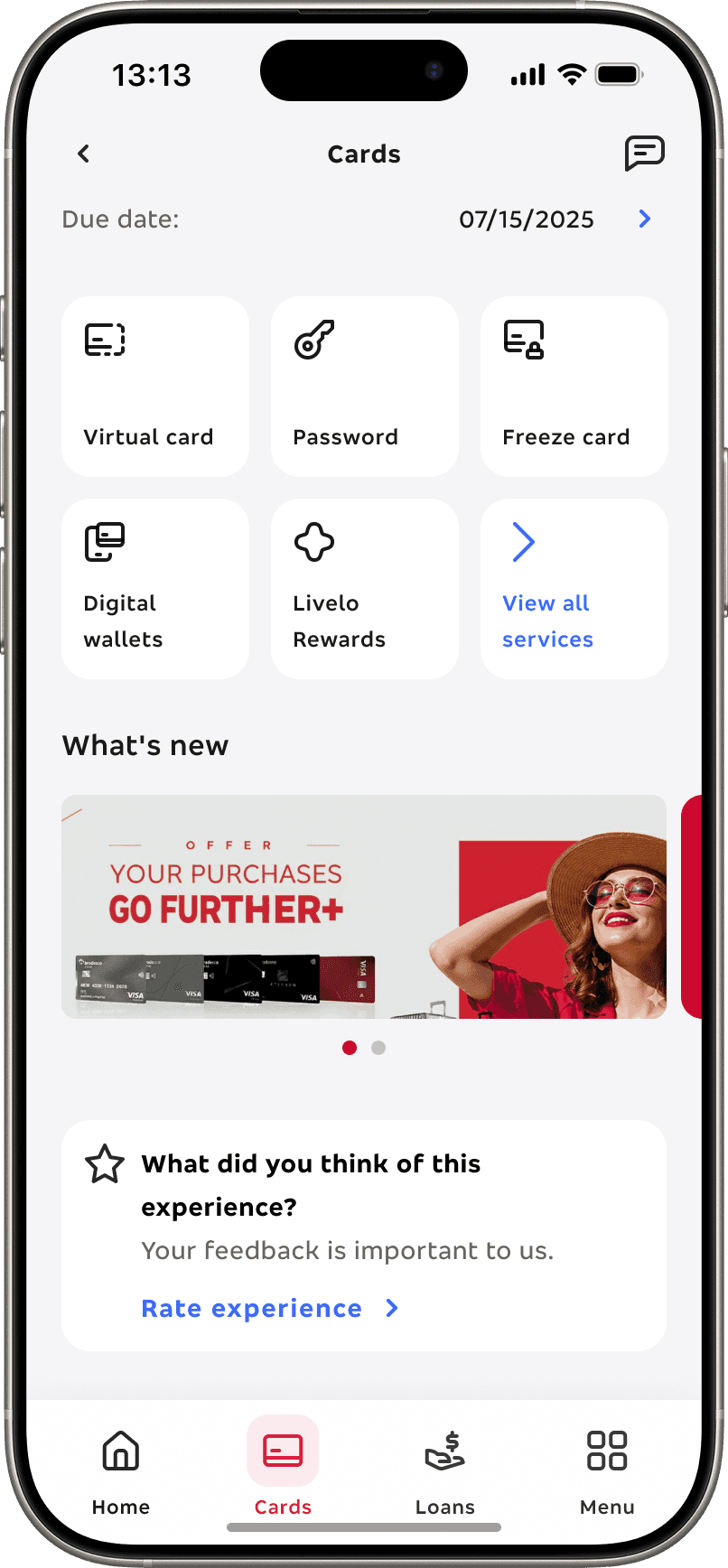
I redesigned the selected card screen to improve feature discoverability and reduce cognitive overload.

06

The last opened card now opens by default, saving the user extra steps.

07

Improved content hierarchy to minimize scrolling and prioritize the most relevant actions.

08

Included the freeze card button in the top section for quick access.

09

Expanded the quick-access area with more actions and relocated the virtual card to the first position — preserving its visibility while reducing visual clutter by removing a separate section.

Selected card

I redesigned the selected card screen to improve feature discoverability and reduce cognitive overload.

06

The last opened card now opens by default, saving the user extra steps.

07

Improved content hierarchy to minimize scrolling and prioritize the most relevant actions.

08

Included the freeze card button in the top section for quick access.

09

Expanded the quick-access area with more actions and relocated the virtual card to the first position — preserving its visibility while reducing visual clutter by removing a separate section.

Before

After

Card menu organization

I restructured how services and card-related actions are grouped to minimize effort and improve scanability.

10

Grouped features according to user priorities discovered during testing (card sorting).

11

Applied alphabetical sorting and a more minimal layout, making the experience cleaner and easier to navigate.

12

Introduced a “View All Services” button to reduce initial cognitive load while preserving access to all features.

13

Used a more minimal layout for a cleaner experience.

Card menu organization

I restructured how services and card-related actions are grouped to minimize effort and improve scanability.

10

Grouped features according to user priorities discovered during testing (card sorting).

11

Applied alphabetical sorting and a more minimal layout, making the experience cleaner and easier to navigate.

12

Introduced a “View All Services” button to reduce initial cognitive load while preserving access to all features.

13

Used a more minimal layout for a cleaner experience.

Bra_Next Credit/Debit

B2K

P2

Pure Debit
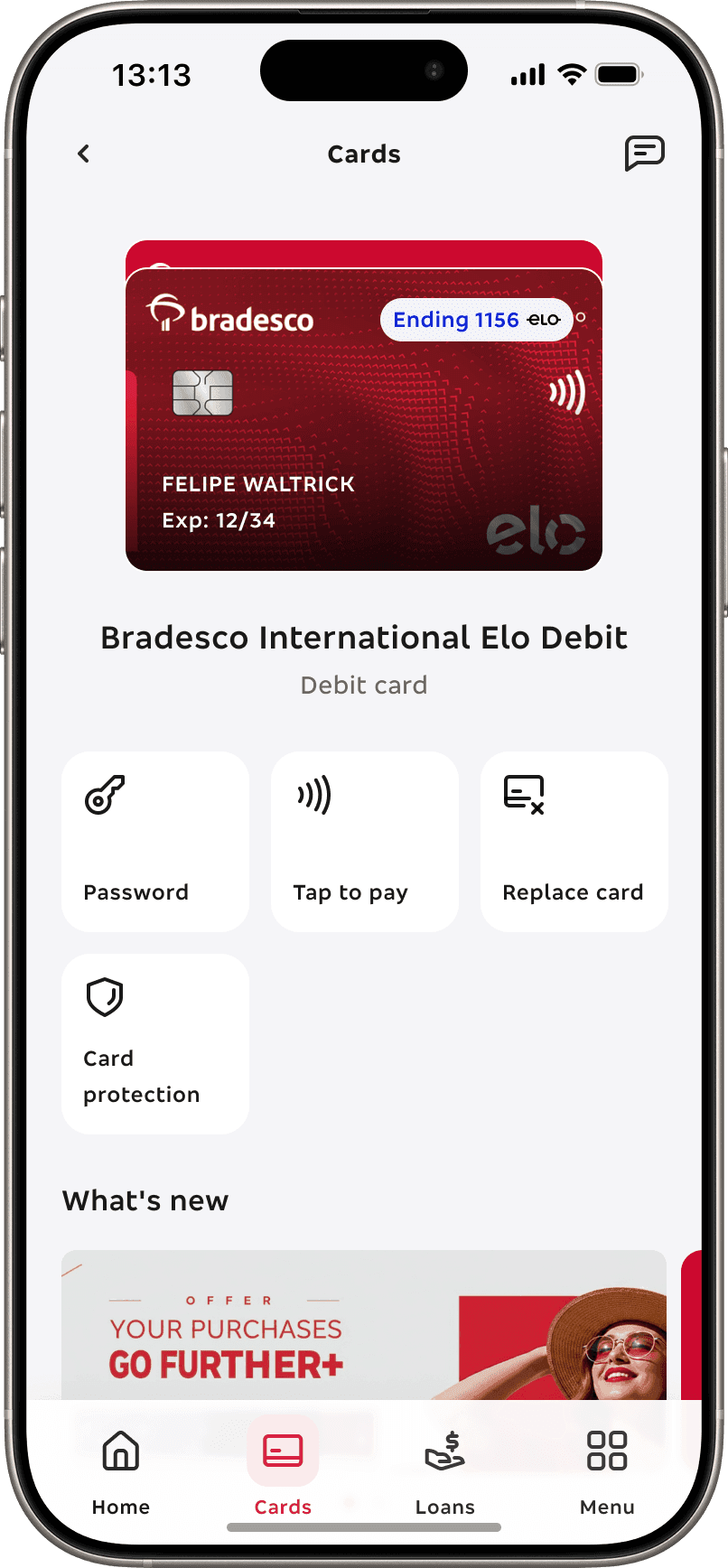
Bra_Next Debit
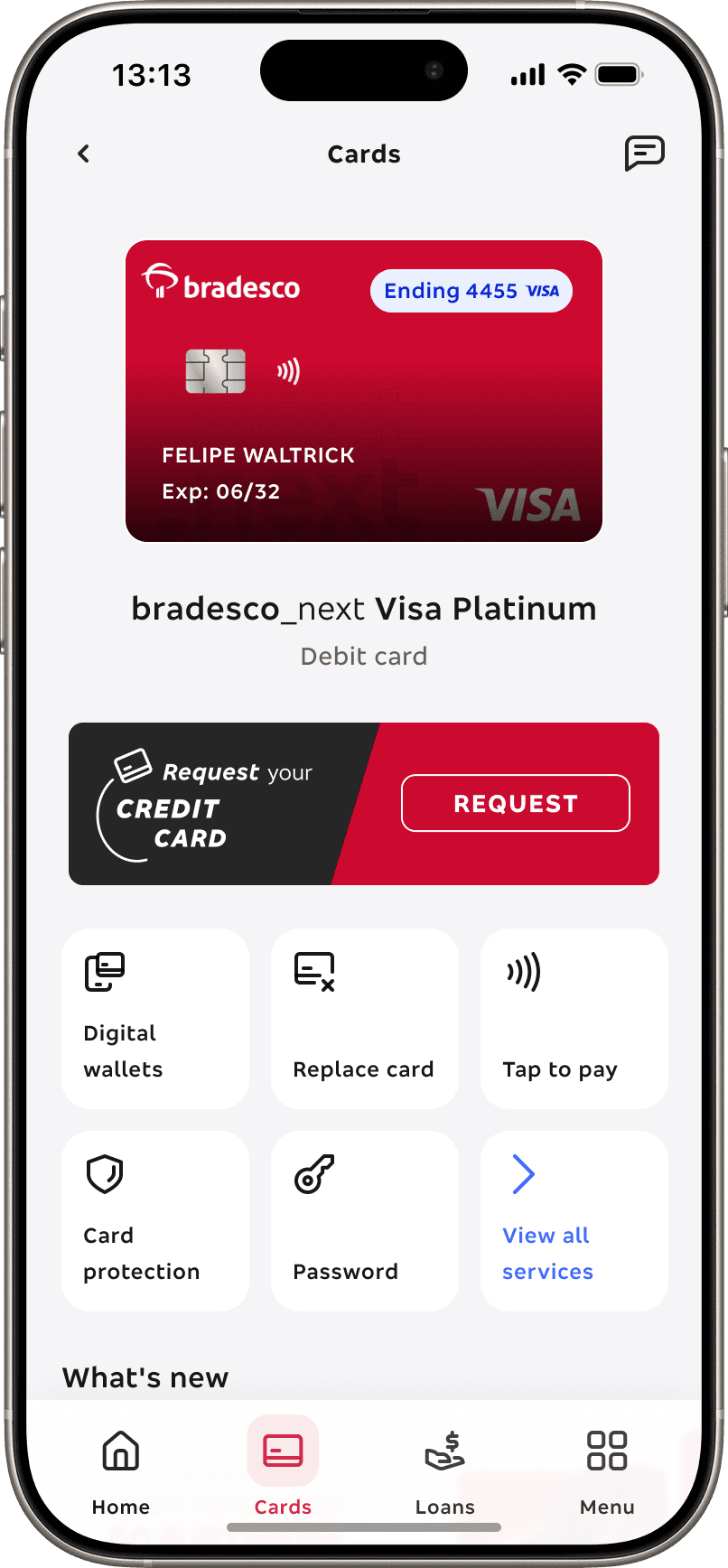
At this point, a standalone bradesco_next debit card was also added to the scope. It works similarly to the multi card, minus the credit-related features.
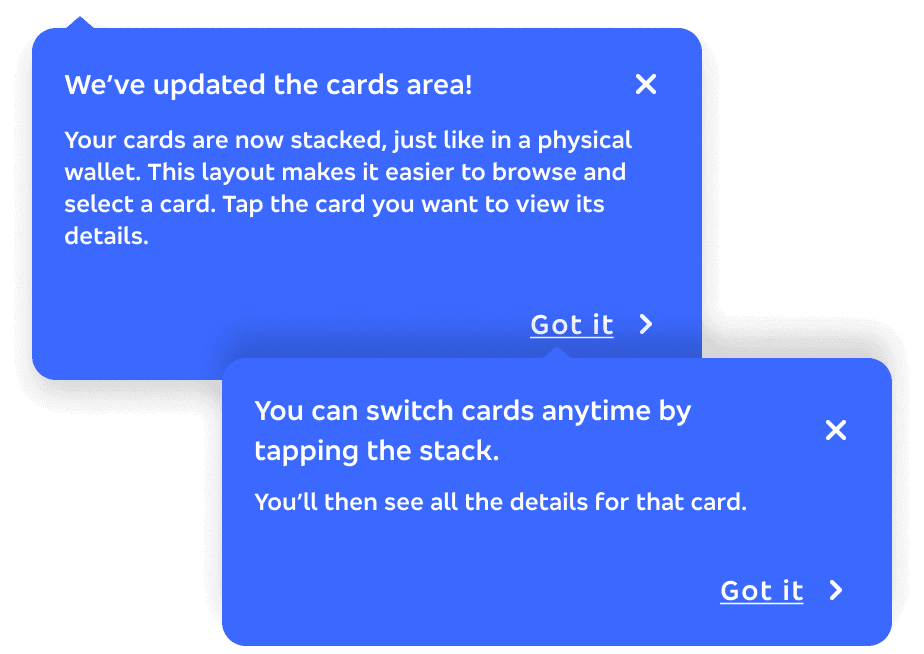
Onboarding

I created an onboarding for the stack format so we could make sure all users could learn how to use it

The onboarding followed a linear path: all users had to go through onboarding when they first received their second card or migrated with +2 cards already. This way, they would learn how their cards were displayed and also how to interact/change them. After going for the onboarding, all next access will open automatically the previous card opened.

Onboarding

I created an onboarding for the stack format so we could make sure all users could learn how to use it

The onboarding followed a linear path: all users had to go through onboarding when they first received their second card or migrated with +2 cards already. This way, they would learn how their cards were displayed and also how to interact/change them. After going for the onboarding, all next access will open automatically the previous card opened.

06 — RETEST

After refining the prototype we wanted to validate if the changes truly worked and effectively enhanced user usability, so we re-tested the product

Quantitative research

We conducted an unmoderated usability test to observe real user behavior and evaluate comprehension across the new interface. The goal was to measure navigation patterns, interaction behavior, success rates, average completion time, and identify hot zones of engagement through a data-driven approach.

We conducted an unmoderated usability test to observe real user behavior and evaluate comprehension across the new interface. The goal was to measure navigation patterns, interaction behavior, success rates, average completion time, and identify hot zones of engagement through a data-driven approach.

Goal

Re-test the Bradesco_Next cards area, comparing usability scores and behavioral metrics based on the findings and hypotheses that emerged from the first test.

Goal

Re-test the Bradesco_Next cards area, comparing usability scores and behavioral metrics based on the findings and hypotheses that emerged from the first test.

Sample

The prototype was tested by 467 participants — 246 users from the Next app and 221 from the Bradesco and Bradesco Cards apps.

Sample

The prototype was tested by 467 participants — 246 users from the Next app and 221 from the Bradesco and Bradesco Cards apps.

Profile

Participants included both men and women aged 18 and above, representing all income ranges and distributed across different regions of Brazil.

Profile

Participants included both men and women aged 18 and above, representing all income ranges and distributed across different regions of Brazil.

01

Setting up the test

A fully navigable prototype was built in Maze to simulate real user interactions inside the Bradesco_Next experience

02

The task

Participants were asked to access the card area, select the Visa Signature card and perform a temporary block (Freeze card) — the same task conducted during the first test.

03

Results analysis

We analyzed Maze performance metrics, clicks, completion rates, and error patterns — then compared them with the results from the first test.

01

Validating changes

01

Validating changes

First impressions were very positive

The new version achieved an average increase of 10 points in usability score compared to the previous one. In addition, there was a higher direct success rate and a lower abandonment rate, showing that the implemented changes had a positive impact on overall performance.

FIRST VERSION

SECOND VERSION
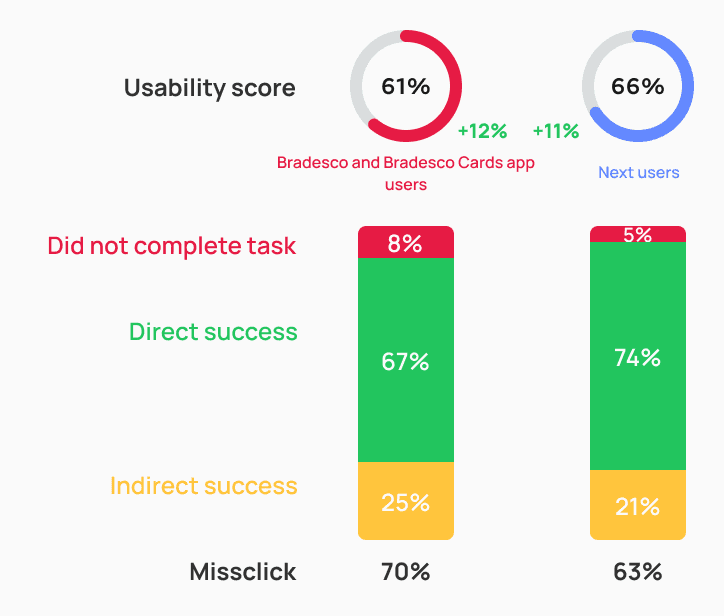
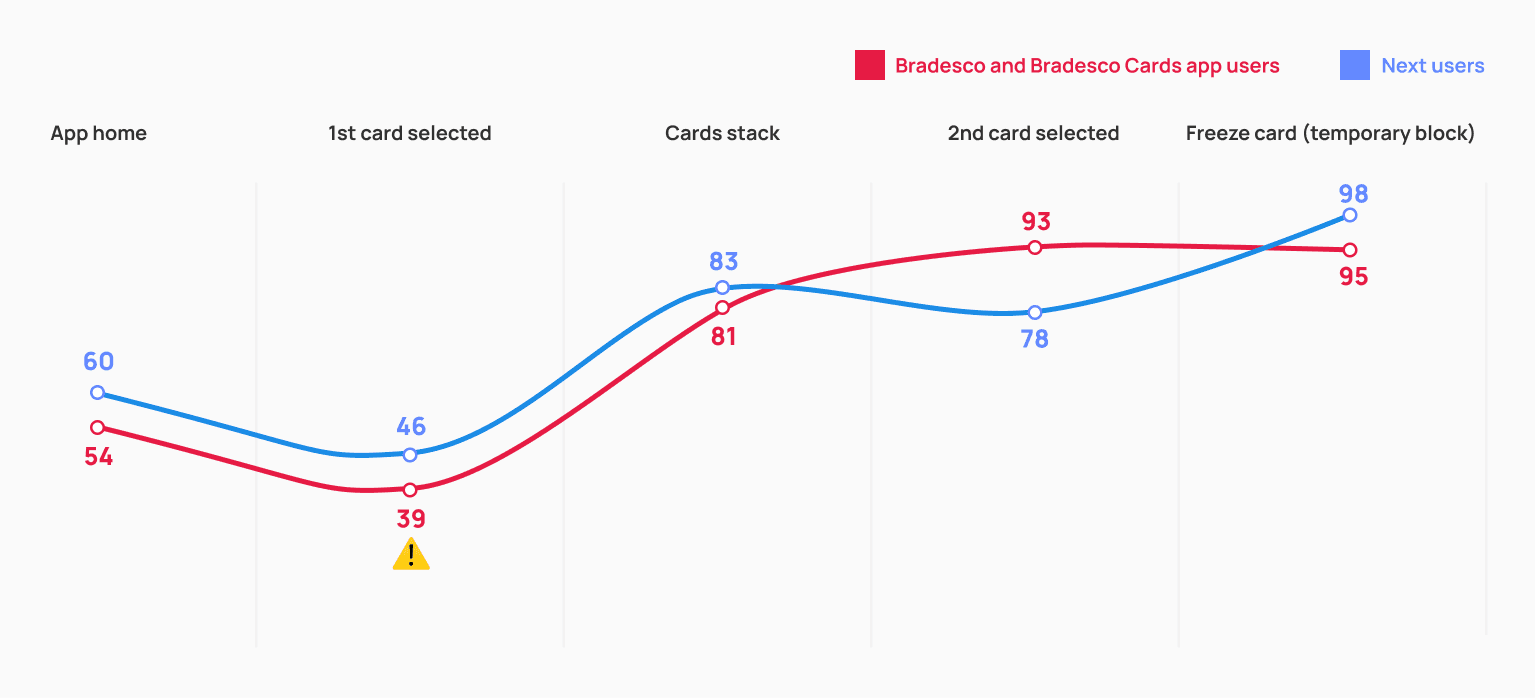
The screen where the first card opens automatically still causes some friction, but the rest of the journey feels intuitive and shows significant improvements compared to the first version.

The automatic opening of the first card lacked context for users to understand it as part of a stack.

SCREEN BY SCREEN
02

Learning curve Insights

Learning curve

It’s still not fully intuitive for participants to understand that they need to tap the card to access the stack and switch between cards — reinforcing the need for a walkthrough on their first access to the card area.

As a result, the miss-click rate remained relatively high at this stage. Still, we managed to slightly reduce both the abandonment rate and the average click time among Next users compared to the first test.

BRADESCO AND BRADESCO CARDS APP USERS
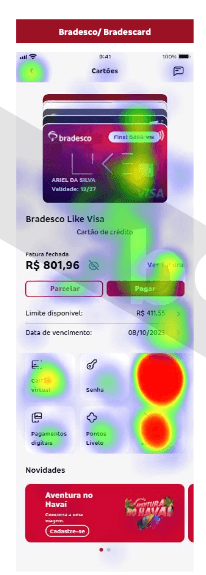
Usability score

39

Missclick

93%

Abandonment rate

4%

Average click time

32s

NEXT USERS
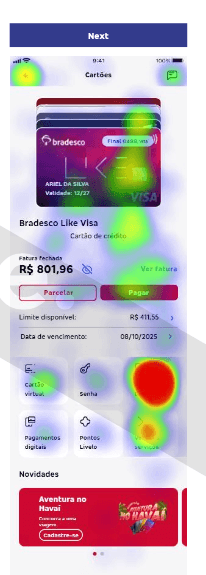
Usability score

46

Missclick

89%

Abandonment rate

2%

Average click time

22s

The location of the features is clear, but it wasn’t obvious that I needed to tap the card.

R.M., 27 years

Administrative Assistant — Belo Horizonte, MG. Next user

03

Enhancing clarity and usability

Ease of use and card identification

Adding the last four digits and the card brand logo directly to the card art significantly improved users’ ability to identify and switch between their cards.

This change proved to be more effective than using only “debit or credit” tags, as in the first test — making navigation smoother and reducing confusion when multiple cards were displayed.

Stack accessibility

Participants with low vision previously struggled to distinguish between similar-colored cards — often perceiving two stacked cards as a single one.

By introducing a white outline around each card, we increased visual contrast and made it easier for users with visual limitations to clearly identify individual cards within the stack.

How would you rate the ease of switching between cards?

Very easy

Easy

Neutral

Difficult

Very difficult

FIRST VERSION

SECOND VERSION
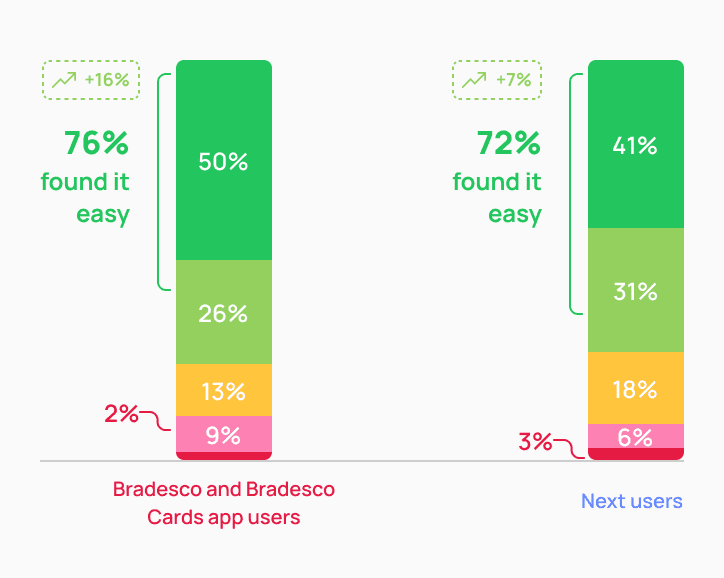
Card selected screen

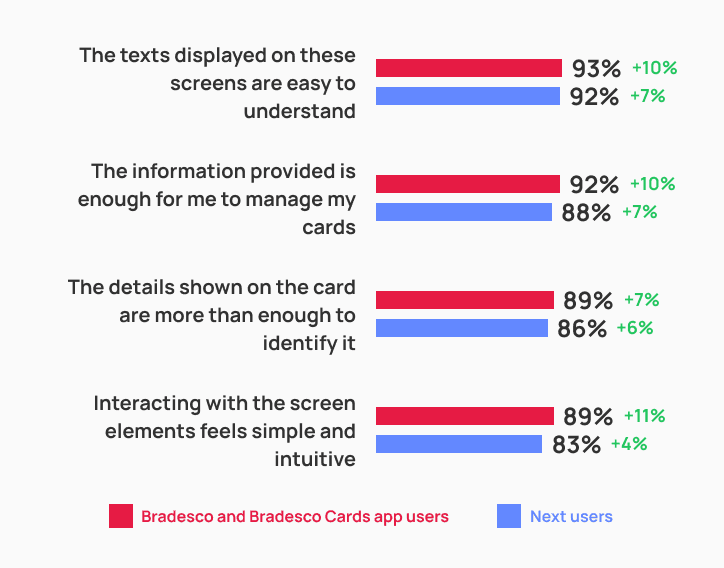
Even with a cleaner layout and fewer elements on screen, the selected card screen received a more positive evaluation overall — showing a notable increase across all measured parameters.

This confirms that the new proposal performed better than the first version and achieved the expected results.

FIRST VERSION
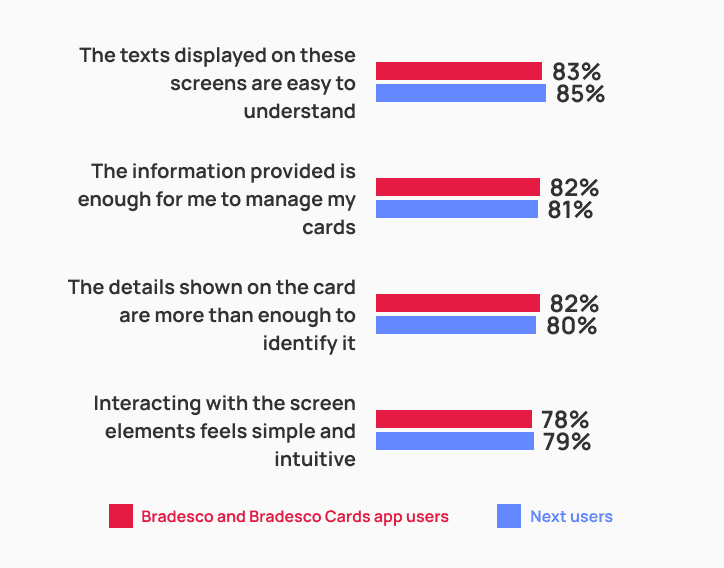
SECOND VERSION
04

Onboarding effectiveness

First-time onboarding test

To validate the learning curve issue from the first test, we introduced a one-time onboarding flow — shown only once to users who had never interacted with the stack before, whether migrating from other Bradesco apps with multiple cards or just receiving a new one.

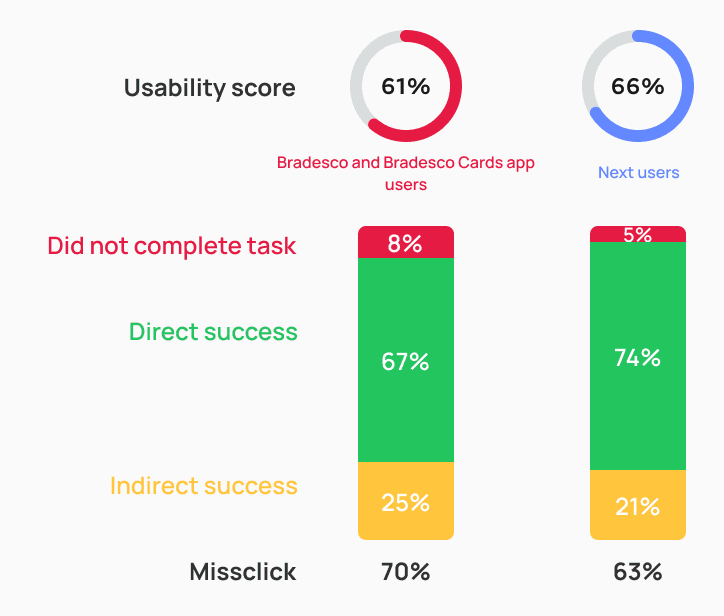
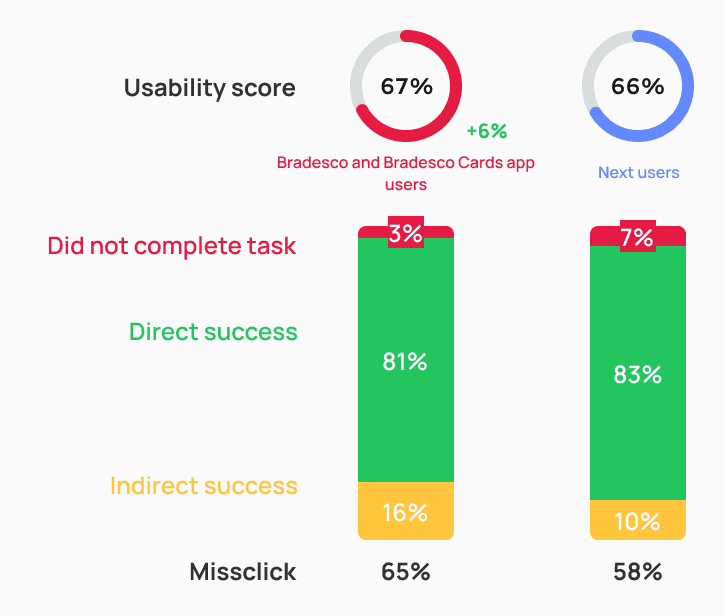
By comparing groups with and without onboarding, we confirmed it was effective, especially among Bradesco and Bradesco Cards users, who showed higher success rates and a better understanding of how to access and switch cards.

WITHOUT ONBOARDING
WITH ONBOARDING
It was very intuitive, and the messages that appeared guided me in the right direction.

B.T., 21 years

Student — Curitiba, PR. Next user

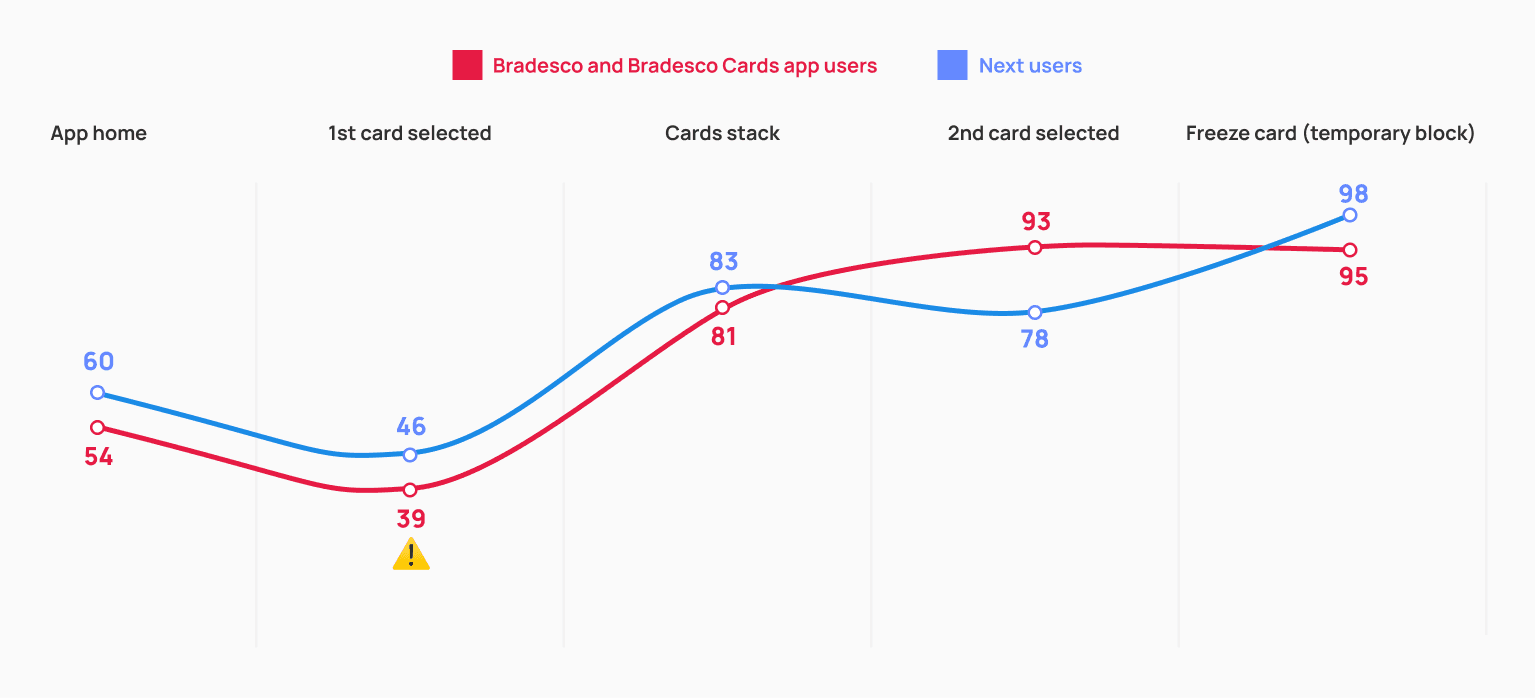
The screen where the first card opens automatically — previously one of the weakest points — showed a significant improvement after the introduction of the onboarding flow.

Users understood more clearly that the first visible card was part of a stack, which reduced friction and increased the usability score.

SCREEN BY SCREEN - WITHOUT ONBOARDING
SCREEN BY SCREEN - WITH ONBOARDING
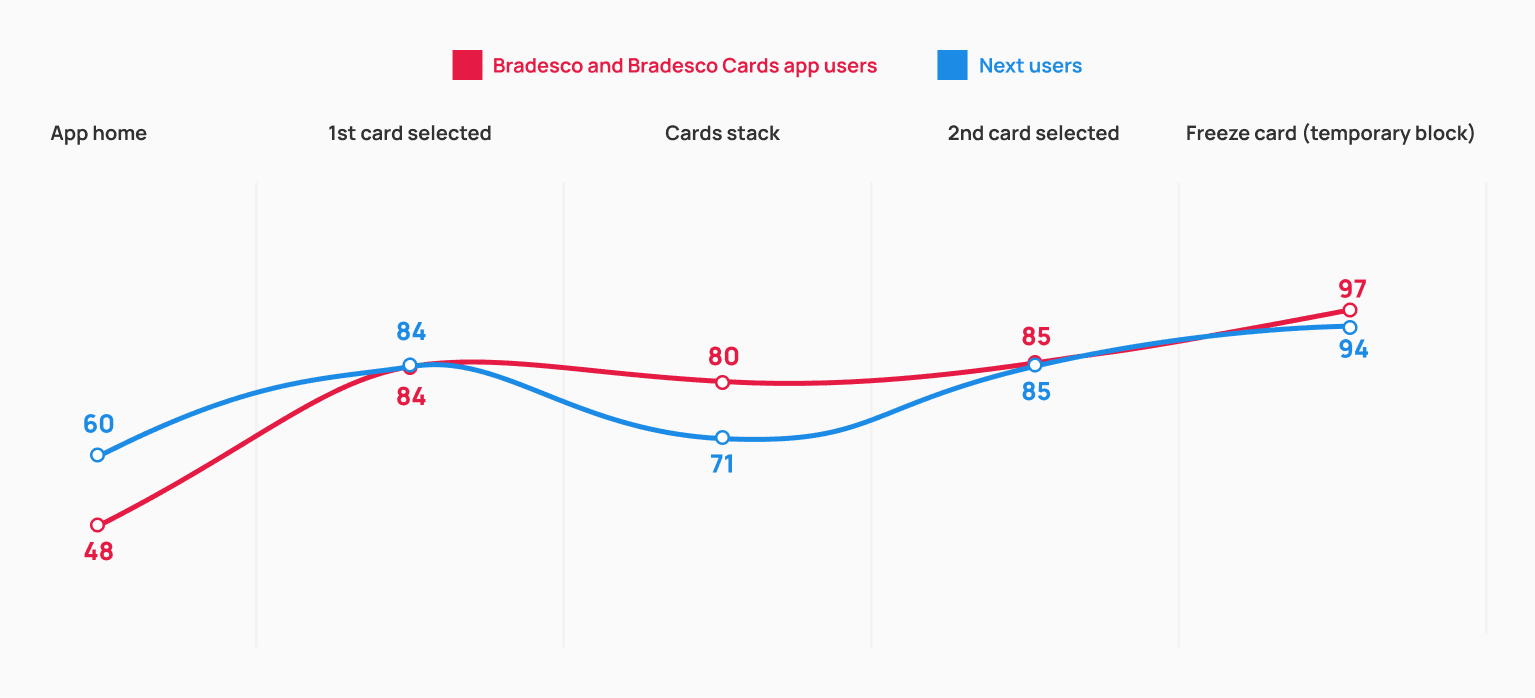
With the guidance to tap the card to access the stack, there was a significant reduction in both the misclick rate and the average completion time.

WITHOUT ONBOARDING

Usability score

43

Missclick

91%

Abandonment rate

3%

Average click time

27s

WITH ONBOARDING

Usability score

84

Missclick

24%

Abandonment rate

1%

Average click time

1,9s

Ease of use and card identification

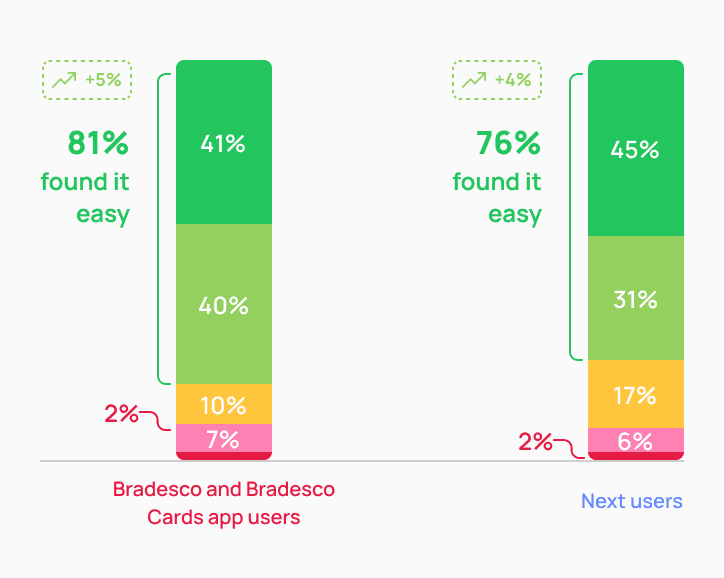
Displaying the cards stack as the first screen of the journey — along with the onboarding flow — made more participants consider it easy to switch between the cards they wanted to view.

This change proved to be more effective than using only “debit or credit” tags, as in the first test — making navigation smoother and reducing confusion when multiple cards were displayed.

How would you rate the ease of switching between cards?

Very easy

Easy

Neutral

Difficult

Very difficult
WITHOUT ONBOARDING

WITH ONBOARDING
07 — DELIVER

After multiple research and iteration cycles, we reached a version that met all predefined success criteria

07 — DELIVER

After multiple research and iteration cycles, we reached a version that met all predefined success criteria

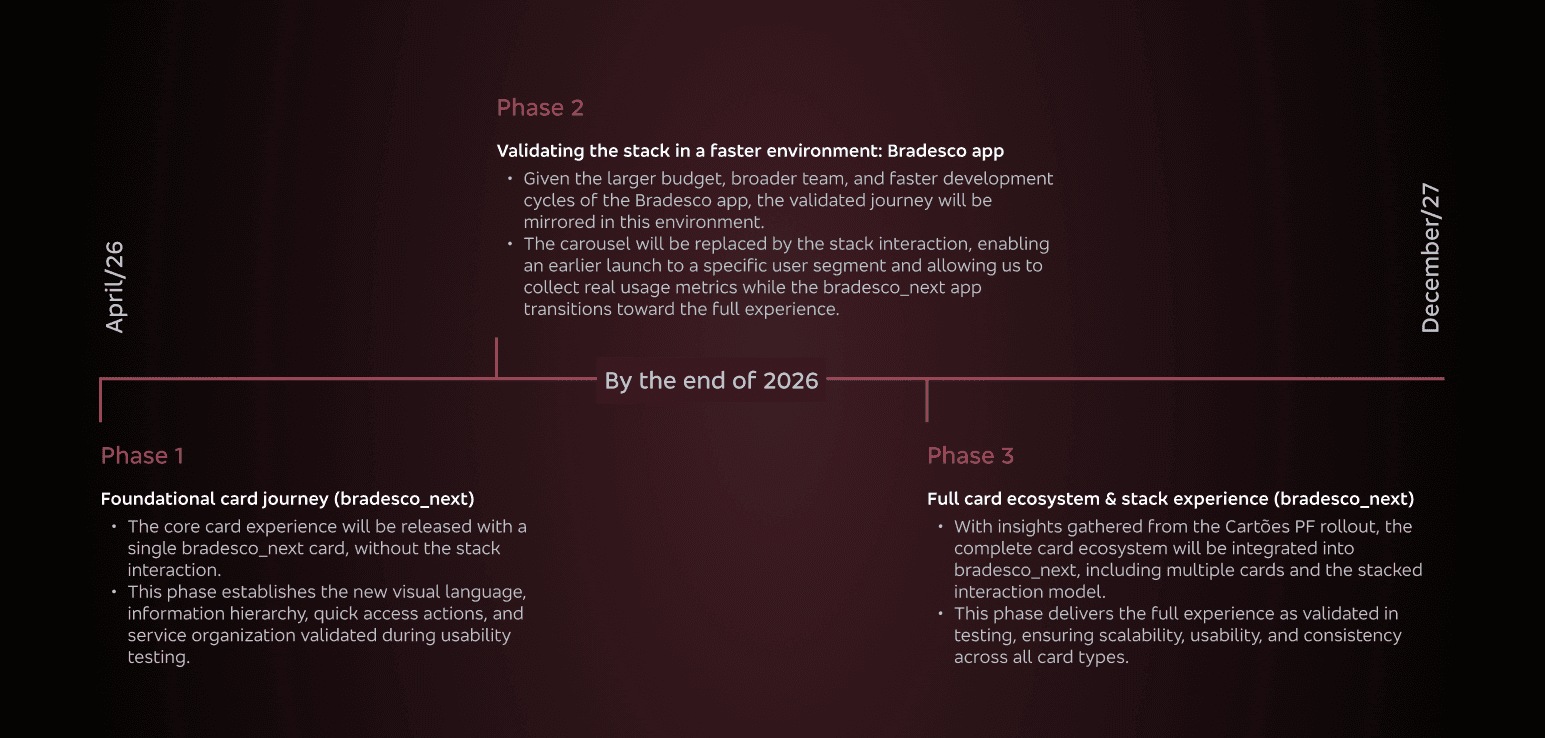
Results from the second usability test confirmed that no structural changes were needed, allowing us to confidently move forward with the proposed solution.

Due to technical and operational constraints, the solution will be developed in phases. The final experience delivered in phase 2 reflects exactly what was validated through user testing.
But how are we going to measure success?

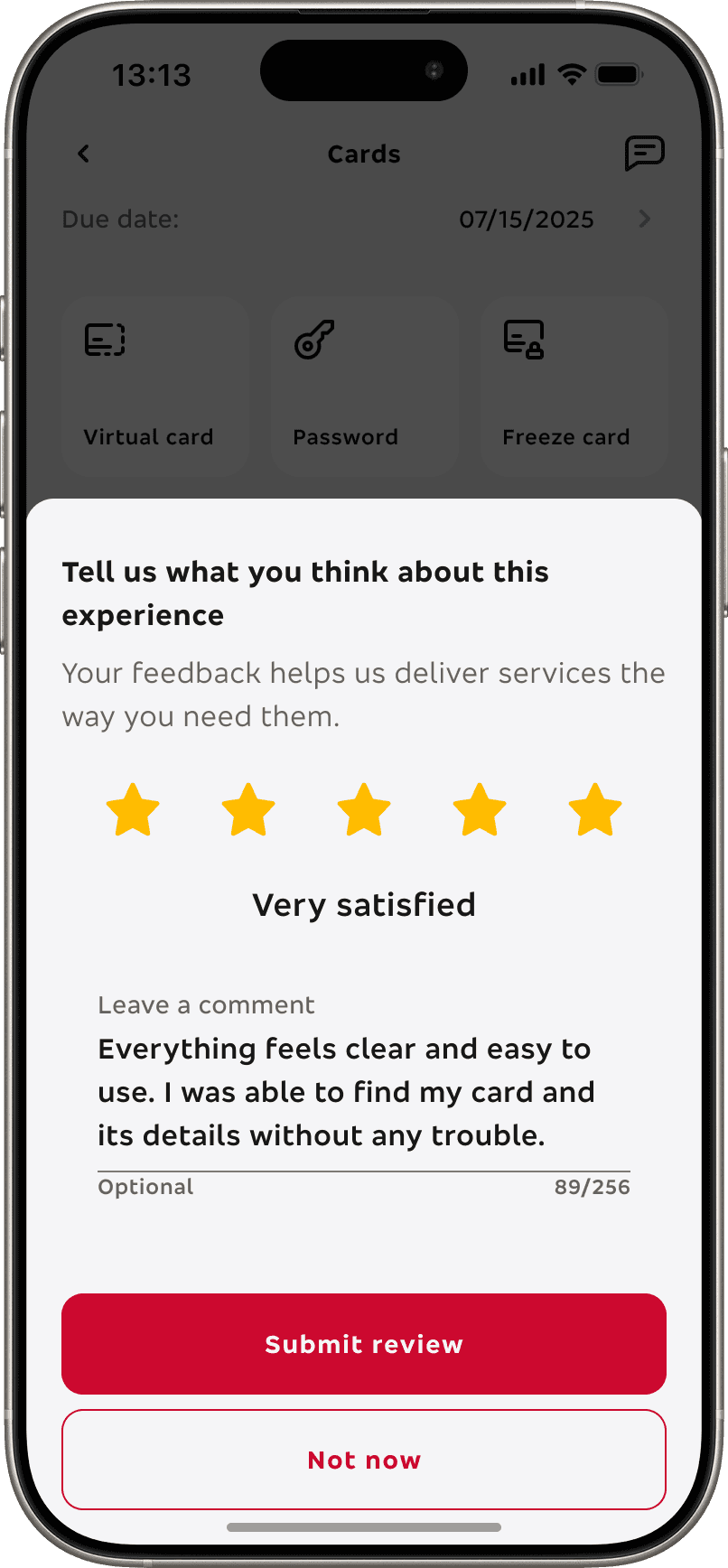
To ensure continuous quality after launch, the journey will be fully instrumented from day one. In addition to behavioral tracking, we also designed an in-journey CSAT to capture qualitative feedback at the right moment.

But how are we going to measure success?

To ensure continuous quality after launch, the journey will be fully instrumented from day one. In addition to behavioral tracking, we also designed an in-journey CSAT to capture qualitative feedback at the right moment.

Behavioral metrics

Task completion rate

Time to complete key actions

Card switch frequency

Abandonment rate

Feature discovery rate

Experience metrics

In-journey CSAT (0–5 stars after card activation)

Qualitative feedback from open text responses

The same experience and behavioral metrics defined for bradesco_next will also be collected in the Bradesco app.

Success benchmark examples

After 6 months in production, we’ll consider the journey successful if:

60%+ of ratings are 4 or 5 stars

Task completion remains above 75%

No critical friction points emerge from qualitative feedback

Experience metrics

CSAT - Customer satisfaction score

01

The survey appears immediately after the user completes the card activation flow, when the experience is still fresh. Users can rate the journey from 0 to 5 stars and optionally leave a written comment.

Experience metrics

CSAT - Customer satisfaction score

01

The survey appears immediately after the user completes the card activation flow, when the experience is still fresh. Users can rate the journey from 0 to 5 stars and optionally leave a written comment.

CTA rating button

Rating template

Even with the product still not fully in production, I am extremely happy and confident that it reached its full potential, specially since it met all predefined success criteria (OKRs).

The stack layout outperformed the carousel, confirming it as the best interaction model.

The new card sub-home achieved 80%+ usability score with onboarding, exceeding our benchmark for excellence (70%).

Users rated the final version with an average 74% ease-of-use score, indicating a clear and intuitive experience.

UI, copy, interactions, and information clarity scored between 80–90% approval, showing strong overall acceptance.

No critical usability issues were identified in the second test.

all done! thank you so much for reading this far, you are a true legend and I hope we can work together soon. Dm me ;)